
A Guide to Case Management for Law Firms
So, what exactly is case management for law firms? Think of it as the central nervous system for your entire practice. It’s the system that organizes every case file, tracks every critical deadline, manages client communications, and handles the repetitive administrative work that can bog down a busy firm.
It's not just software. It’s the digital equivalent of a flawlessly organized office where every document, note, and conversation is right at your fingertips, exactly when you need it.
The Foundation of a Modern Law Firm

Let’s be honest—trying to run a modern law firm with paper files, sticky notes, and a jumble of spreadsheets is a recipe for disaster. Important documents get saved to one person’s desktop, client updates disappear into individual email inboxes, and court deadlines live on a physical wall calendar that no one else can see.
This old-school approach creates frustrating information silos. It makes collaboration a nightmare and dramatically increases the risk of a missed deadline or a misplaced file. It’s not just inefficient; it’s a serious liability. This is the exact problem modern case management for law firms was built to fix.
From Chaos to Control
A proper case management system brings everything together. It creates a single, reliable hub for every case, giving your entire team a clear view of what’s happening at any moment. That shared understanding is the key to working together effectively.
This table shows just how stark the difference is between the old way and the new standard.
Manual vs. Modern Case Management
| Aspect | Manual Approach (The Old Way) | Modern System (The New Standard) |
|---|---|---|
| Information | Scattered across emails, desktops, and file cabinets. | Centralized in one secure, accessible digital hub. |
| Deadlines | Tracked on physical calendars or personal reminders. | Automated calendar entries and team-wide alerts. |
| Collaboration | Relies on endless meetings and email chains. | Built-in task assignments and real-time updates. |
| Documents | Prone to version control issues and being lost. | Secure cloud storage with version history. |
| Client Updates | Inconsistent and requires manual effort to track. | Integrated communication logs and client portals. |
A great system doesn't just organize you; it fundamentally changes how you work.
The right platform transforms a firm’s operations from a series of disconnected, manual tasks into a cohesive, streamlined workflow. It's the difference between navigating a complex case with a messy pile of maps versus using a precise, real-time GPS.
Instead of a patchwork of tools that don't talk to each other, a modern platform gives you:
- A Unified Hub: Every piece of case information—documents, notes, emails, and deadlines—is kept in one place.
- Automated Workflows: Repetitive jobs like client intake, document creation, and deadline reminders are handled automatically, freeing up your team for actual legal work.
- Effortless Collaboration: Team members can assign tasks, share updates, and review documents without ever leaving the system, which puts an end to confusion and version control headaches.
Is It Case Management or Matter Management?
You’ll often hear these terms used as if they mean the same thing, but there's a subtle and important difference. Case management usually refers to the day-to-day operational tasks tied to a specific legal proceeding, like litigation. It’s all about managing the process of a formal case.
Matter management is a bit broader. It covers all the activities related to a client's legal issue, which might not be a formal "case" at all. To get a better handle on this, you can learn more about what matter management involves in our detailed guide. Understanding the distinction will help you choose the right tools for your firm.
Essential Features of a Modern System

While having a single system sounds great in theory, the real value is in what it actually does. A modern case management for law firms platform is really defined by a handful of core features that solve the most nagging problems in any practice. These aren't just fancy add-ons; they're the engine that keeps your firm moving forward.
Think of it like a well-stocked toolbox. You need more than just a hammer. You need the right tool for each specific job, and they all need to be within arm's reach. Let's look at the absolute must-haves for any firm.
The Centralized Case Dashboard
At the very heart of a great system is the centralized case dashboard. This is your firm's command center, giving you a bird's-eye view of every active matter. No more digging through old emails or tapping a colleague on the shoulder for an update—you get a live snapshot of case progress, looming deadlines, and recent activity.
A good dashboard puts an end to the frantic "fire drills" that pop up when information is scattered everywhere. It ensures everyone from the senior partner to the newest paralegal is on the same page, which is the bedrock of real collaboration.
Robust Document Management
Let's be honest: chaotic file management is a massive source of risk and wasted time. A proper case management system comes with integrated document management, ending the madness of having five different versions of a motion saved on three different desktops.
By corralling every document—from initial drafts to final court filings—into one secure, organized place, you create a single source of truth. This simple shift dramatically cuts the risk of using an outdated document and makes working together a whole lot easier.
This is about much more than just storage. You should expect key functions like:
- Version Control: The ability to see every change made to a document, who made it, and when. You can even roll back to a previous version if you need to.
- Secure Access: Set detailed permissions that control exactly who can see, edit, or share sensitive client files.
- Full-Text Search: Find what you need by searching for a phrase inside a document, not just by remembering its obscure file name.
We explore this topic in much more detail in our guide to document management for law firms.
Automated Calendaring and Deadline Tracking
Missed deadlines are a lawyer's worst nightmare and a leading cause of malpractice claims. A modern system tackles this head-on with smart calendaring that automatically tracks critical dates. Instead of you manually entering every deadline, the software can calculate them based on your jurisdiction's rules of procedure.
Think of it as an intelligent safety net. The system sends out automated reminders to the whole team as key dates get closer, so nothing falls through the cracks. It keeps statutes of limitation, filing deadlines, and court appearances front and center, building a more organized and defensible practice.
Integrated Communication and Time Tracking
Top-tier case management for law firms also captures every client conversation. An integrated log keeps a running history of all emails, phone calls, and messages tied to a specific case. This complete, chronological record is accessible to anyone on the team, which finally kills the "I thought you told them..." confusion.
Finally, you need seamless time and expense tracking. When your team can log billable hours right inside the case file they’re working on, accuracy shoots up and lost revenue goes down. This simple integration links the work being done directly to the billing cycle, which makes invoicing faster, more accurate, and a lot less painful.
What's the Real ROI on Case Management Software?
Beyond the bells and whistles of features, let's talk about the bottom line. What's the actual business impact of bringing the right case management software into your firm? This isn't just another line item on your expense report; it's a strategic move that can fundamentally change how your firm operates for the better.
The value becomes crystal clear once you start putting numbers to it. Just think about all those non-billable hours your team sinks into administrative quicksand—hunting for documents, manually punching in data, or chasing colleagues for an update. A good system automates these repetitive chores, turning that wasted time directly back into billable hours you can recover.
This simple shift creates a powerful ripple effect. When attorneys and paralegals are no longer bogged down by administrative grunt work, they can pour their energy into high-value tasks: crafting legal strategy, advising clients, and growing the business. That's not just a boost for morale; it's a direct injection into your firm's ability to generate revenue.
It's More Than Just Billable Hours
While clawing back billable time is a huge win, the true ROI of case management software goes much deeper. You'll feel the financial impact across your entire practice, building a more resilient and profitable firm from the ground up.
The real magic of an effective case management system lies in its ability to eliminate the hidden costs of inefficiency. It tackles everything from the price of a costly mistake to the lost opportunity of a client who felt neglected.
To get a real handle on the financial upside of a new system, it helps to understand the basics of how to calculate return on investment. Here are a few key areas where you’ll see a serious return:
- Fewer Costly Errors: When all your information is in one place and deadlines are tracked automatically, you drastically cut the risk of missing a court date or using an old version of a document. Those are the kinds of mistakes that can lead to malpractice claims and tarnish your firm's reputation.
- Happier Clients: Smooth communication and quick response times make for happy clients. And happy clients are the ones who pay their bills on time, come back for more business, and—most importantly—send you valuable referrals.
- Better Cash Flow: With built-in time tracking and billing, every minute of work gets captured accurately. Our guide on legal billing software for small firms dives into how this speeds up your invoicing cycle, which means you get paid faster and maintain healthier cash flow.
A Small Firm's Story of Growth
Picture a small litigation firm just trying to keep its head above water. Before getting a dedicated system, its three attorneys were drowning in messy email threads, files scattered across different drives, and the constant, nagging fear of a missed deadline. Their growth was completely choked by the operational chaos.
But after they brought in a modern case management platform, things changed almost overnight. Client intake turned into a smooth, automated workflow. Documents became centralized and instantly searchable. And everyone on the team could see the status of every case on a single, shared dashboard.
The result? Within a year, the firm was able to handle 30% more cases without hiring a single new person. Collaboration was seamless, mistakes vanished, and the partners could finally focus on planning for the future instead of just putting out daily fires. This is a perfect example of the powerful ROI that the right technology can unlock.
However, just buying the software isn't a silver bullet.
Adoption is everything. Over two-thirds of litigation departments now have these systems in place, but there's a telling gap between ownership and actual use. Only 57% of trial lawyers actively use the platform their firm provides. This means a lot of firms aren't getting the full return on their investment, and it explains why 43% believe they could save a lot more time if they had a better or different solution. You can find more details on these litigation support trends on NALA.org.
How AI Is Redefining Legal Workflows

For a long time, traditional case management software was a game-changer. It took the mountains of paper and endless file cabinets and gave us a digital home for everything. It brought order to the chaos, but it was still a passive system. You had to do all the work—finding the right document, connecting the dots between events, and drafting everything from scratch.
Now, artificial intelligence is turning these digital filing cabinets into active, intelligent partners. It’s no longer just a place to store your work; it's a tool that helps you do your work.
Think of it this way: The old systems were like a basic calculator. You punch in the numbers, and it gives you an answer. An AI-first workspace is more like a smart assistant. It anticipates your needs, pulls information together for you, and helps you execute complex tasks with simple voice commands. The intelligence is baked into the core of the platform, not just tacked on as an afterthought.
From Passive Storage to Proactive Assistance
This is where things get really interesting. When the system doesn't just store information but actually understands it, a whole new world of efficiency opens up. The platform starts shouldering some of the cognitive load, helping you get work done faster and with fewer errors.
What does that look like day-to-day?
- AI-Powered Summaries: You've just received thousands of pages of discovery. Instead of spending days reading through it all, an AI can generate a concise, factual summary in minutes, giving you a bird's-eye view of the key issues right away.
- Hands-Free Commands: No more clicking through endless folders. You can simply say, "Show me the inspection report from the Smith case," and the system knows exactly what you mean and pulls up the document instantly.
- Automated Document Drafting: Need to draft a standard client letter or a motion? The AI can grab the right template, pull in the relevant case data, and produce a solid first draft in seconds, saving you from tedious, repetitive work.
This isn't some far-off future concept; it's happening right now. The legal industry's adoption of AI has been explosive. In 2023, only 19% of law firms were using AI. Fast forward to 2024, and that number has skyrocketed to 79% of legal professionals, with a quarter of them using it extensively in their daily operations.
The AI Navigator: A Central Intelligence Hub
An AI-first workspace like Whisperit flips the script with a concept called the AI Navigator. This is essentially an always-on assistant that understands the context of what you're doing. It follows you from your case dashboard to a document editor, ready to help with whatever comes next.
It's a huge leap from constantly toggling between different tabs and tools. The AI Navigator weaves the entire workflow together, creating a seamless journey from one task to the next.
An AI Navigator acts as the connective tissue for your entire legal workflow. It streamlines the journey from initial client intake all the way to the final exported document, turning a series of disjointed steps into a single, fluid process.
For example, you could be looking at a case overview and tell the Navigator, "Draft a client letter from the correspondence template." It pulls up the right template and pre-fills it with the client's information. As you dictate the letter, the system transcribes in real time. When you’re done, you can say, "Email this draft to the senior partner for review." Each step flows naturally into the next, all guided by your voice. To get a better handle on the technical side of this, it's worth exploring different AI automation strategies.
This AI-driven approach is fundamentally changing how firms operate. By taking over administrative burdens and routine cognitive tasks, it frees up attorneys to focus on what truly matters: high-level strategy, client advocacy, and complex legal analysis. The impact of generative AI for law firms is already creating a real competitive edge for firms that get on board early. It’s the next logical step in the evolution of case management for law firms—transforming it from a system that just organizes your work into one that actively helps you win.
How to Choose the Right Platform
Picking the right case management system is easily one of the most important technology decisions your firm will ever make. This isn't just about buying a piece of software. You're choosing the central hub that will define your workflows, shape your client service, and ultimately dictate your capacity for growth. The only way to get it right is with a clear, structured evaluation that looks past the flashy sales pitches and gets down to the fundamentals: security, integration, and scalability.
Think of it like bringing on a new partner. You need someone reliable, who you can trust implicitly, and who has the ambition to grow alongside you. A rushed decision can lead to years of operational headaches, but a thoughtful one will set you up for long-term efficiency and success.
This visual guide breaks down the three make-or-break stages for evaluating any legal software, focusing on the non-negotiables that will make your investment a secure and future-proof one.
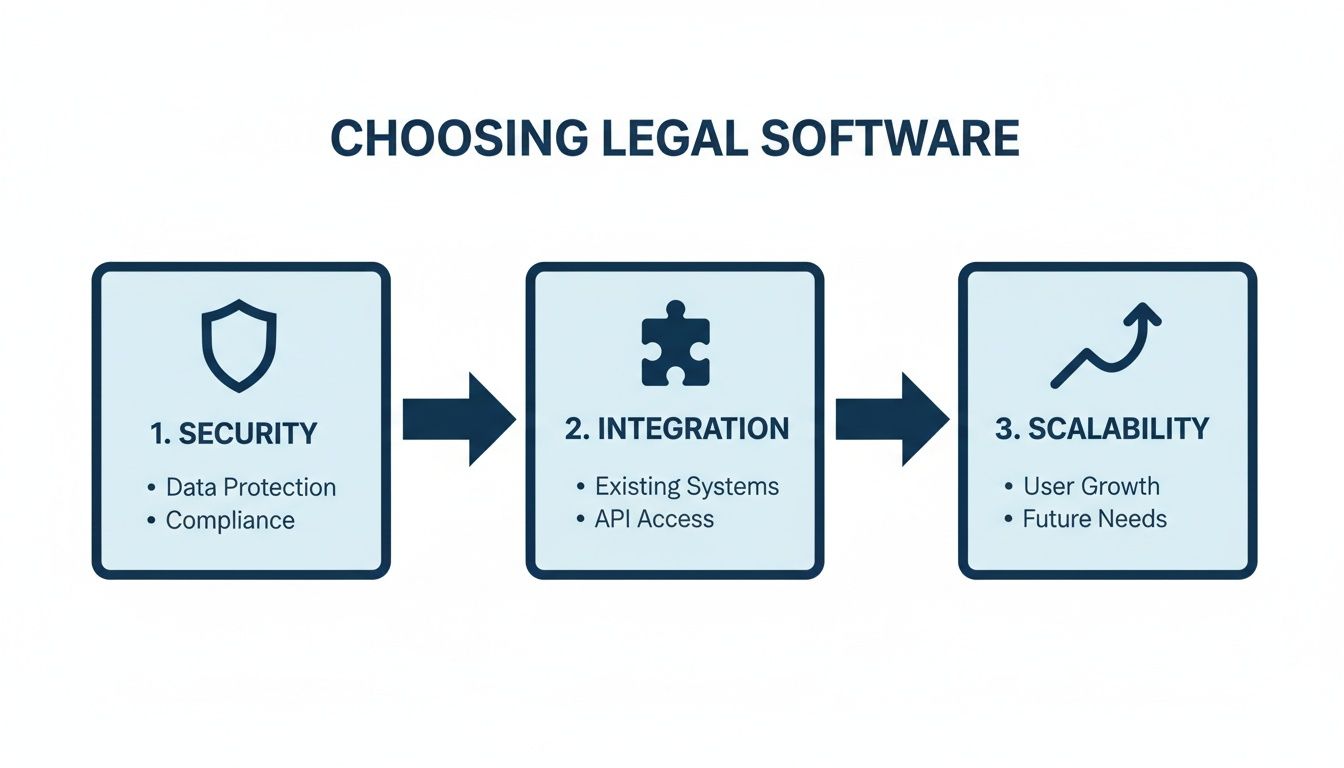
The real takeaway here is that these three pillars—security, integration, and scalability—are deeply interconnected. You have to assess them together to be sure a platform can handle not just where you are today, but where you plan to be tomorrow.
Step 1: Start with the Non-Negotiables: Security and Compliance
Before you even agree to a demo, your very first checkpoint has to be security. In the legal profession, protecting client data isn't just a good idea; it's a core ethical and legal duty. A single data breach can shatter client trust and your firm's reputation in the blink of an eye.
You need to ask vendors the tough questions right out of the gate:
- Encryption Standards: Is all data—both when it’s moving and when it’s stored—locked down with strong, end-to-end encryption?
- Access Controls: How granular can you get with permissions? Can you control exactly who can see, edit, or share specific case files and documents?
- Data Residency: Where is your data physically stored? If you have clients in Europe, you absolutely need options for Swiss or EU hosting to stay on the right side of GDPR.
These aren't just technical details. They are the absolute bedrock of modern case management for law firms.
Step 2: Vet for Integration and Scalability
A great platform doesn't operate in a vacuum. It should act as a central command center that talks seamlessly to the other tools you already depend on, like your email client, document management system, and accounting software. This kind of connectivity is what prevents frustrating data silos and keeps your team working in a single, unified environment.
Just as crucial is the system's ability to grow with you. A platform that feels great for a two-person practice might completely fall apart under the weight of ten attorneys and a ballooning caseload. Look for a solution that can scale up effortlessly, adding more users, cases, and data without ever slowing down. This is where cloud-based systems have become so popular—they offer the flexibility and security modern firms need, often while lowering infrastructure costs.
Step 3: Don't Forget the Human Element: User Experience
Finally, never, ever underestimate the importance of the user experience (UX). The most feature-packed software on the market is completely worthless if your team finds it clunky, confusing, or just plain frustrating to use. A system with a steep learning curve will be met with resistance and low adoption, torpedoing your entire investment.
A platform is only effective if it feels intuitive from the moment you log in. It should make complex tasks simpler, not add another layer of work to your team's already-full plate.
When you're evaluating options, insist on a hands-on trial for your entire team, not just the partners making the final call. Let your paralegals, associates, and administrative staff put it through its paces with real-world tasks. Can they figure out how to log their time without a manual? Is it easy to find a specific document? Their honest feedback is the most valuable data you can possibly collect.
Making a thoughtful decision requires a systematic approach. The checklist below can help you structure your evaluation and compare potential vendors on the criteria that truly matter.
Vendor Selection Checklist
| Evaluation Criteria | Key Questions to Ask | Why It Matters |
|---|---|---|
| Security & Compliance | What are your encryption protocols? Where is our data stored? Are you compliant with standards like GDPR, HIPAA, or CCPA? | A breach is a firm-ending event. Security is the absolute first priority, no exceptions. |
| Core Features | Does it have robust document management, time tracking, billing, and calendaring? Does it fit our specific practice area's needs? | The software must excel at the daily tasks that drive your firm's productivity and profitability. |
| Integration Capability | Can it connect with our email (Outlook/Gmail), accounting software (QuickBooks), and document storage (Dropbox/Google Drive)? | A system that doesn't integrate well creates data silos and inefficient, manual workarounds for your team. |
| User Experience (UX) | Is the interface intuitive? How steep is the learning curve? Can our team test it with a real-world trial? | Poor adoption will kill your ROI. The software must be easy and even enjoyable for your team to use every day. |
| Scalability & Performance | Is it cloud-based? How does it handle a sudden increase in users or case volume? What is the guaranteed uptime? | Your firm is built for growth. Your central software system needs to be able to grow right along with you without breaking. |
| Support & Training | What does your onboarding process look like? Is customer support included? What are the support hours and typical response times? | A great partner provides support beyond the sale, ensuring your team can get help when they're stuck. |
| Pricing & ROI | Is the pricing per user, per case, or a flat fee? Are there hidden costs for implementation, data migration, or support? | You need a clear understanding of the total cost of ownership to accurately calculate the return on your investment. |
By walking through this checklist, you can move beyond the sales pitch and make an informed, confident decision. Our comprehensive guide on the best legal case management software offers even more criteria to help you dig deeper. By focusing on these core areas, you can choose a platform that not only meets your needs today but also empowers your team to do their best work for years to come.
Your Roadmap to Successful Implementation
Let’s be honest: the best case management software on the planet is useless if your team won’t actually use it. A successful launch isn't about just flipping a switch one day. It’s a carefully planned process that respects the human side of change. Without a solid roadmap, that big investment you just made can quickly become a source of daily frustration.
The move from your old way of doing things—cobbled-together spreadsheets, scattered files, you name it—to a single, unified system requires a real strategy. The work starts long before anyone logs into the new platform, focusing on getting your people, your data, and your workflows ready for what's ahead. This is how you sidestep the implementation disasters you hear about.
Stage 1: Data Migration and System Customization
First up is the heavy lifting: data migration. This is the meticulous process of moving every last case file, client record, and document from wherever it currently lives into your new system. Whether it’s coming from old software or a chaotic mess of network folders, this step needs a rock-solid plan to make sure nothing gets lost or scrambled along the way.
At the same time, you'll be configuring the new platform to match how your firm actually works. This isn't about reinventing your legal processes; it's about making the software support them. Think of it like getting a suit tailored. You're not changing your body to fit the suit—you're making the suit fit you.
This customization phase often involves things like:
- Creating custom data fields for unique case types (like personal injury vs. estate planning).
- Building out automated workflow templates for your specific client intake process.
- Defining user permissions so the right people have access to the right information.
Stage 2: Phased Rollout and Real-World Training
Ripping the Band-Aid off with a firm-wide launch can be a recipe for chaos. A much smarter approach is a phased rollout. Start small with a pilot group—maybe one practice area or your most tech-friendly team. This lets you work out the kinks and solve problems on a small scale before they can disrupt the entire firm.
And then there's training, which is probably the most make-or-break part of this whole thing. Generic tutorials that just walk through software features are a waste of time.
The only training that sticks is training that’s tied to real-world tasks. Show your team exactly how to do their everyday jobs in the new system—from opening a new matter to billing their time. When they can immediately see how it makes their work easier, the benefits become real.
Stage 3: Securing Buy-In and Continuous Improvement
Change is hard, and some resistance is inevitable. The best way to get your team on board is to bring them into the process early. Ask for their opinions when you're choosing a system. Listen to their worries. When people feel like their voices are heard and can see how this new tool will genuinely help them, they’re far more likely to get on board.
Finally, remember that "go-live" day isn't the finish line. Implementation is an ongoing process. Set up simple ways to gather feedback after the launch, like regular check-in meetings or a dedicated Slack channel. Use that input to make tweaks and improvements, ensuring the software grows with your firm and you get every ounce of value out of it.
Frequently Asked Questions
Making the leap to a new case management system is a big decision, and it’s natural to have questions. You're not just buying a piece of software; you're fundamentally changing how your firm operates. Let's tackle some of the most common questions we hear from legal professionals weighing this exact choice.
Getting the answers right at this stage is crucial. It’s about making a smart investment that will become the operational heart of your practice for years to come.
How Long Does It Take to Implement a New System?
There's no single answer here—it really depends on the size of your firm and the state of your current data. A smaller practice with well-organized files could be up and running in a few weeks. For a larger firm with decades of complex case data to migrate, you might be looking at a timeline closer to two to four months.
The smoothest transitions almost always happen in phases. A typical rollout looks something like this:
- Discovery & Planning: Pinpointing your goals and tailoring the platform to match.
- Data Migration: The careful process of moving every client file, document, and deadline.
- Pilot Group: Letting a small, tech-savvy team kick the tires and work out any kinks.
- Firm-Wide Launch: Rolling it out to everyone with hands-on, practical training that mirrors your actual workflows.
Remember, a platform with a clean, intuitive design will significantly cut down on the training time and help your team get comfortable faster.
Is Cloud-Based Case Management Software Secure?
Yes, and in many ways, it's far more secure than what most firms can manage on their own with an on-site server. Reputable cloud providers invest millions in security infrastructure—an expense that's simply out of reach for the average law practice. The trick is knowing what to look for.
Security in a quality cloud system isn't just a feature; it's the entire foundation. The best vendors build their platforms on a bedrock of security protocols like end-to-end encryption, multi-factor authentication, and granular access controls that let you decide exactly who sees what.
Always ask a potential vendor for their security credentials. If you handle international cases, it's also smart to inquire about data residency options in privacy-focused jurisdictions like Switzerland or the EU to stay compliant with regulations like GDPR.
Can This Software Integrate with Other Tools We Use?
It absolutely has to. A modern case management system that doesn’t play well with others isn’t much of a system at all. It should act as the central nervous system for your firm, connecting seamlessly with the tools your team lives in every day—from email like Outlook and Gmail to your accounting software and document storage.
This connectivity is what breaks down those frustrating data silos, where information gets trapped in one program and has to be manually entered into another. Before you sign any contract, make a list of your non-negotiable tools and verify that the platform offers solid, pre-built integrations or has an open API to make sure it fits perfectly into your existing tech setup.
Ready to see how an AI-first workspace can unify your entire legal workflow from intake to export? Discover Whisperit and transform your practice with a calmer, more efficient way to work. Learn more at whisperit.ai.