
A Law Firm Invoice Template That Gets You Paid Faster
A good law firm invoice template does more than just ask for money. It's a fundamental tool that creates a standard for your billing, cuts down on disputes, and helps you get paid faster by clearly explaining the work you've done. Moving away from manual, error-prone methods to a solid template is the first real step toward a healthier, more efficient billing cycle for your firm.
Why Your Generic Invoices Are Costing You Money

Most lawyers know the frustrating routine all too well. You spend hours carefully putting together an invoice, only to get a call from a client who’s confused by vague entries like "Legal Research" or "Case Review." These generic descriptions, often leftovers from old spreadsheet templates, just create friction, hold up payments, and chip away at your client's trust.
This isn't just an administrative chore; it's a real threat to your firm's bottom line. Vague invoices are an open invitation for questions and disputes, which pushes back your payment schedule and messes with your cash flow. Plus, manually copying time entries into a generic document is a perfect recipe for errors, which can lead to big compliance headaches, especially when you're dealing with trust accounts.
The True Cost of Outdated Billing
The problems with generic invoicing go way beyond just being annoying. Every billing error or client question represents unbillable time spent fixing a mistake that could have been avoided in the first place. That lost time adds up, hitting your firm's profitability hard.
Think about the real drains on your finances and operations:
- Delayed Revenue: Inconsistent and unclear bills are the number one reason for late payments. This forces your team to waste valuable time chasing down money you've already earned.
- Increased Administrative Overhead: The hours spent manually creating, checking, and fixing invoices are hours that could have been spent on actual client work or growing your business.
- Eroded Client Trust: When clients can't understand what they're paying for, they start to question the value of your services. This can seriously damage the long-term relationship.
- Compliance Risks: Manual work dramatically increases the chances of making a mistake with trust accounting, which can have severe regulatory consequences.
In the legal field, standardized invoice templates have been a true game-changer. I know one small firm that saw a 40% reduction in billing disputes almost immediately after they started using consistent descriptions and templates. It’s a powerful reminder of how much clarity matters. Historically, manual invoicing with spreadsheets is a breeding ground for transcription errors and inconsistent language, which completely undermines trust. You can learn more about how firms are getting these results and even download legal invoice examples to see for yourself.
A professional invoice does more than just request payment; it communicates the value you've delivered. It’s a final, critical touchpoint that reinforces your firm's credibility and professionalism, turning a simple bill into a tool for building client loyalty.
Shifting From Manual Labor to Smart Automation
The answer is to leave these outdated methods behind. A dedicated law firm invoice template, particularly when it's integrated with your workflow, can automate the whole process. Tools like Whisperit can link your dictated notes directly to the right case matter, making sure every single billable moment is captured with perfect accuracy.
This kind of integration gets rid of the manual data transfer—the step where most errors happen. It guarantees that when you calculate billable hours, every entry is precise and detailed. The end result is a clean, professional, and indisputable invoice that gets you paid faster and frees up your team to focus on what really matters: practicing law.
The Anatomy Of An Indisputable Law Firm Invoice
A great invoice does more than just ask for money—it’s the final, clear story of the value you delivered. Think of it as a blueprint for getting paid promptly, without a single question, because you’ve left zero room for confusion. Every single piece of information on that document has a job to do, building trust and showcasing your professionalism.
Before we dive into the nitty-gritty, it helps to remember what an invoice really is. For a solid refresher, this guide on understanding what an invoice is and why it matters is a great starting point. It really frames why each element we’re about to break down is so important for your firm's financial health.
Let's break down the essential components that every law firm invoice needs to be effective, clear, and compliant.
Essential Fields For Your Law Firm Invoice Template
Every invoice you send is a reflection of your firm's attention to detail. The table below outlines the non-negotiable fields your template must have. Getting these right from the start prevents countless headaches down the road.
| Component | Description | Why It's Critical |
|---|---|---|
| Firm Identity & Contact | Your firm's full name, logo, address, phone, email, and website. | Establishes professionalism and makes it easy for clients to reach you with questions. This is your digital letterhead. |
| Tax ID Number | Your firm's EIN or Tax Identification Number. | Essential for your client's accounting and tax records; it signals that you're a legitimate, organized business. |
| Unique Invoice Number | A sequential, unique identifier for each invoice (e.g., 2024-1001). | Absolutely non-negotiable for tracking payments, accounting, and any future communication about the bill. |
| Key Dates | The date the invoice was issued and the date payment is due. | Clearly sets payment expectations and helps you manage accounts receivable. Ambiguity here leads to late payments. |
| Client & Matter Info | The client's full name and the specific case or matter name/number. | Directly links the bill to the specific work performed, preventing mix-ups, especially for clients with multiple matters. |
| Billing Period | The exact start and end dates for the services being billed. | Provides a clear timeframe for the work, answering the client's unspoken question: "What am I paying for this month?" |
| Detailed Line Items | An itemized list of each task: date, detailed description, time spent, rate, and subtotal. | This is the core of the invoice. It justifies your fees by showing the work, not just telling. Transparency prevents disputes. |
| Expenses Breakdown | A separate, itemized list of all reimbursable costs (e.g., filing fees, court reporters). | Separates your labor from pass-through costs, which is crucial for clarity and IOLTA/trust accounting compliance. |
| Summary & Total Due | A clear summary of all service fees and expenses, leading to a final, bolded total. | Makes it incredibly easy for the client to see the bottom line without having to do the math themselves. |
Getting these fields right isn't just about good practice; it's about creating a document that is fundamentally easy to understand and pay.
Your Firm's Professional Identity
The top of your invoice is prime real estate. It needs to instantly identify your firm and make you look like the professional you are. This isn't just branding—it's about credibility and making yourself accessible.
This header section should always include:
- Your Firm's Full Name and Logo: This is the first mark of a professional document.
- Complete Contact Information: Your physical address, phone number, email, and website should be front and center.
- Tax Identification Number: Including your firm's Tax ID or EIN is a must for your client’s accounting team and shows you run a tight ship.
A tip from experience: When you set up your invoice numbering, don't start with "Invoice #001." Kicking off with a higher number, like 1001, subtly projects an image of an established, busy practice. It’s a small detail that can boost a new client's confidence.
Critical Invoice and Client Details
This section is all about connecting the bill to a specific client, a specific matter, and a specific period. Precision here is your best defense against those time-wasting emails and calls asking for clarification.
Make sure your template has fields for:
- A Unique Invoice Number: This is non-negotiable for tracking and communication.
- Invoice Date and Due Date: Clearly state when the bill was issued and when you expect payment.
- Client Name and Matter Reference: Use the full client name and a specific case or matter number to kill any confusion.
- Billing Period: Define the exact date range for the services, like "For services rendered from October 1, 2025, to October 31, 2025."
The Heart of the Invoice: Detailed Line Items
This is where most invoices either shine or fall flat. Vague, jargon-filled entries are the #1 cause of payment delays and client disputes. Your goal should be to describe the value you provided in plain English.
Think of it this way: Instead of a lazy entry like "Legal Research," try something more descriptive: "Researched precedents related to opposing party's motion to dismiss, identifying key cases to support our argument."
Instead of "Drafted documents," be specific: "Drafted initial asset purchase agreement, including sections on representations, warranties, and closing conditions."
Each line item needs to show the date, a clear description of the work, the hours spent, your rate, and the total for that task. This level of transparency doesn't just justify the bill; it showcases your meticulous work ethic. It turns a simple invoice into a progress report.
When you're building out these and other documents, having a solid framework can be a game-changer. For more on this, check out the resources in our guide to templates for legal documents.
Finally, always wrap up with a clean summary at the bottom. It should total all your service fees and any itemized expenses, presenting one clear, final amount due. This simple structure lets your client easily follow the math from individual tasks right down to the bottom line.
Adapting Your Template For Different Billing Structures
A one-size-fits-all invoice template just doesn't cut it in the legal world. Your firm likely handles a mix of billing arrangements, and your invoice needs to be flexible enough to match the specific agreement for each case. Trying to shoehorn a flat-fee matter into an hourly template, or vice versa, is a recipe for confusion and payment delays.
The goal is to keep your branding and professional look consistent while changing the core service details to fit the billing model. Whether you're billing hourly, charging a flat fee, or working off a retainer, the invoice has to tell the right financial story. Think of it less as a simple bill and more as a clear, compliant report on the value you've delivered.
Customizing for Hourly Billing
When you're billing by the hour, transparency is everything. The client needs to see a clear line connecting the time you spent to the progress on their case. This means your invoice template needs a section for a highly detailed, itemized list of every task. Vague entries are the number one cause of disputes with hourly billing.
For every single task, you should list out:
- The date the work was done.
- A clear, descriptive summary of the task.
- The exact time spent, usually in 6- or 10-minute increments (e.g., 0.3 hours for 18 minutes).
- The hourly rate of the attorney or paralegal who did the work.
- The subtotal for that specific line item.
For example, don't just write "Drafting motions." A client will immediately question that. Instead, be specific: "Drafted Motion in Limine to exclude prior testimony, including research of supporting case law." That level of detail justifies the cost and builds trust.
Invoicing for Flat Fee Arrangements
With flat-fee cases, the invoicing mindset shifts completely. You're no longer tracking time; you're demonstrating progress. Clients who have paid a fixed price want to see that their case is moving forward and that you're hitting key milestones.
Instead of a long list of hours, structure the invoice around project phases or major deliverables. This shows the client exactly what portion of the work their payment covers. For something like an uncontested divorce, you could tie payments to milestones like "Filing of Initial Petition" or "Finalization of Marital Settlement Agreement."
This decision tree flowchart helps visualize the process, starting with the basic firm and client info before getting to the critical service breakdown.
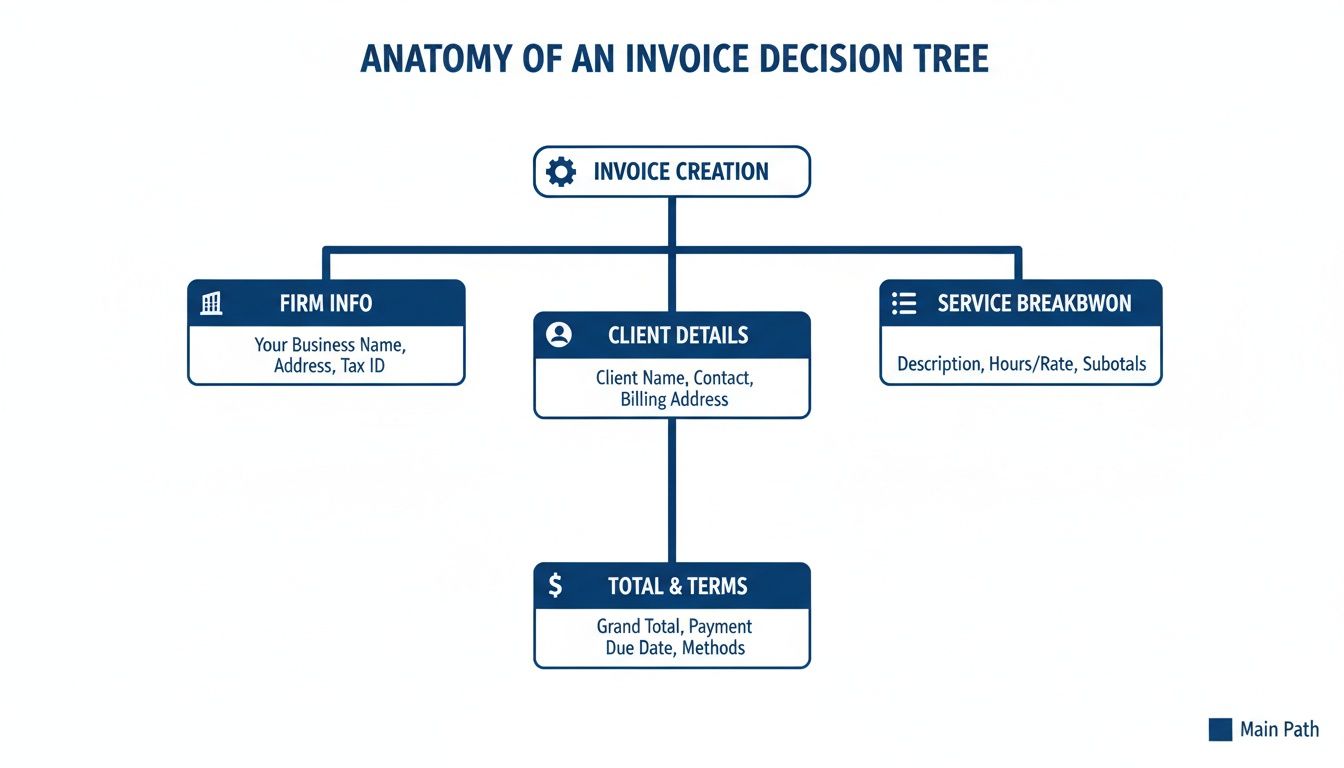
It’s a good reminder that regardless of how you bill, the core components of a good invoice—who you are, who the client is, and what you did—are always essential.
A flat-fee invoice is less about accounting for every minute and more about communicating project momentum. It's a progress report that reinforces the value of the fixed-cost service, assuring the client that their investment is yielding tangible results.
Handling Retainer and Trust Accounting
Working with retainers adds a critical layer of compliance: trust accounting. Your invoice has to be perfectly clear about how you're using the client's funds held in trust. It must act as a transparent statement showing all the activity in that trust account for the billing period.
Your template needs a dedicated section that clearly shows:
- Starting Balance: The amount in the trust account at the beginning of the period.
- Funds Drawn: The total amount of earned fees being moved from the trust account to cover the invoice.
- Remaining Balance: The new, updated balance in the trust account after the payment is made.
This isn't just good business—it's an ethical and legal mandate. This reconciliation gives the client a complete financial picture and protects your firm. Manually tracking this can be risky, which is why so many firms rely on specialized tools. You can explore the benefits of legal billing software for small firms to see how integrating your templates can automate this process, eliminate errors, and ensure every retainer invoice is flawless.
Putting Your Invoice Templates to Work in Your Daily Workflow

A well-designed invoice template is a great start, but its real power is unleashed when it’s woven into the fabric of your firm’s daily operations. The magic isn't in the document itself; it's in how that document connects to your other systems, turning a manual, error-prone chore into an efficient, almost automatic process.
The goal is to kill the tedious steps that eat up billable time. Imagine dictating case notes after a client call, having them instantly transcribed and logged against the correct matter, and then seeing that entry automatically appear on a draft invoice. No manual data entry, no fumbling with timers, no risk of typos—just pure efficiency. This is what separates an adequate billing system from a truly profitable one.
Connect Templates to Your Case Management System
The biggest leap in efficiency comes from linking your invoice template directly to your case or practice management software. This creates a single source of truth for every billable activity, making sure nothing ever falls through the cracks.
When your team tracks time, logs expenses, or records tasks within the case file, that data should flow directly into the billing module. This completely eliminates the dangerous habit of re-keying information from one program to another. Let’s be honest, manual data transfer is where costly mistakes happen. A misplaced decimal point or a task assigned to the wrong client can spark disputes and force write-offs. Integrated systems ensure the information you capture in the moment is the exact information that appears on the final bill.
The ideal workflow is one where the invoice practically builds itself in the background as you work. Every documented action, from a quick phone call to drafting a complex motion, should automatically become a pre-populated line item, just waiting for a final once-over before it goes to the client.
This integration delivers a huge boost to both accuracy and speed. We’ve seen firms that adopt professional, integrated invoice templates cut their billing prep time in half. What used to take hours of manual drudgery now takes seconds. This is a critical gain, especially when you consider that traditional methods cause 20-30% of invoices to need revisions, badly delaying cash flow in a sector that bills over $400 billion annually in the US alone.
Automate Your Time and Expense Capture
A static template still requires you to manually track and enter every minute and every cost. An integrated system, on the other hand, automates the capture. Think about all those small but billable tasks that often go unrecorded simply because it's too much of a hassle.
- Dictation to Invoice: This is where tools like Whisperit shine. When you dictate a memo or client update, the AI not only transcribes your words but also logs the time against the relevant case, creating an instant, detailed billing entry.
- Email and Calendar Hooks: Your system can be set up to prompt you to create a time entry right after a client meeting on your calendar ends, or after you send a substantive email from your firm's account.
- Smart Expense Tracking: If your firm credit card is linked to your software, it can automatically capture and categorize reimbursable expenses like filing fees or travel costs, assigning them directly to the correct client matter.
By automating these inputs, you start capturing revenue that was previously leaking away. Better yet, this approach ensures every line item on the invoice is backed by a solid digital record, providing an unshakeable audit trail if a client ever questions a charge. Exploring https://www.whisperit.ai/blog/legal-workflow-automation is the logical next step for any firm serious about maximizing these efficiencies.
Streamline Your Review and Approval Process
Automation doesn’t just stop at data entry; it also supercharges your internal review process. Instead of printing stacks of draft invoices and passing them around the office, an integrated workflow brings the entire review and approval process online.
Here’s what that looks like in practice:
- Draft Generation: At the end of the billing cycle, the system automatically generates draft invoices for all active matters based on the time and expenses captured.
- Attorney Notification: The responsible attorney gets an automated ping that their drafts are ready for review right inside the system.
- Digital Edits & Comments: The attorney can quickly scan each invoice, make edits, add clarifying notes for the client, or approve it with a single click.
- Final Delivery: Once approved, the system can automatically email the final invoice to the client, often with a convenient link for online payment.
This creates a workflow that's smoother, faster, and far more accountable. While a solid template is the foundation, integrating it with automated invoicing software is what truly transforms billing. It turns a tedious chore into a smooth, self-running process and frees your entire team to focus on high-value legal work instead of chasing paperwork.
Maintaining Compliance And Financial Accuracy

Your invoice template is more than just a request for payment—it’s a critical compliance document. Get this part wrong, and you're not just looking at a clerical error. You could be facing serious ethical violations, painful audits, and lasting damage to your firm’s reputation.
At the heart of it all is the ironclad rule of trust accounting.
Client funds held in trust are not your firm's money. This is the one principle that must govern your entire invoicing process. Your template needs to build a clear, unbreachable wall between your earned fees and the client funds you're holding. This separation has to be visually and mathematically obvious on any invoice that pulls from a retainer.
Mastering Trust Account Transparency
To stay compliant, your invoice has to act as a crystal-clear ledger for the client's trust account. There can be zero ambiguity about where their money is going. Any template you use absolutely must have a dedicated section that breaks down all trust account activity for that billing period.
This isn't optional. That section must show:
- The Starting Balance: What was the trust account balance at the beginning of the billing cycle?
- Funds Applied: How much, exactly, are you transferring from their trust account to cover the fees on this specific invoice?
- The Ending Balance: After applying the payment, what is the remaining balance in their trust account?
This simple, transparent reconciliation is your best defense against compliance headaches. It gives the client a complete financial picture and creates the paper trail your firm needs. Trying to track this manually on a spreadsheet is just asking for trouble; one small human error can snowball into a disaster.
Think of an invoice that involves trust funds as a bank statement. Every single dollar has to be accounted for with absolute clarity. Ambiguity doesn’t just confuse the client; it’s a massive red flag for bar association auditors.
Ensuring Bulletproof Financial Accuracy
Of course, financial accuracy goes beyond trust accounts. Every number on your invoice—from the billable time down to the expense reimbursements—has to be precise and easily justified. Sloppy record-keeping is a fast track to client disputes and writing off revenue you should have collected.
Consider the common points of failure. Are you documenting every single reimbursable expense with meticulous detail? A client shouldn't just see a vague line item for "Filing Fees." They should see "Superior Court Motion Filing Fee" with the exact date and cost. That level of detail eliminates doubt and reinforces your professionalism.
The explosive growth in legal tech is a direct response to this need for precision. The global Legal Case Management Software Market, which is the engine behind the best invoice templates, grew from USD 1.7 billion in 2023 and is projected to reach USD 5.9 billion by 2033. This isn't just about convenience; it's about survival. Firms that resisted automation have historically seen vague time entries and lost expense records cut their revenue by 10-20% annually.
Safeguarding Sensitive Financial Data
Finally, remember that every invoice you create contains highly sensitive financial data for both your client and your firm. How you create, send, and store these documents has to be secure. Sending unencrypted PDFs over email or saving templates on an unsecured local drive is a huge liability.
Modern platforms are built to provide the controls you need to protect this information. Look for key features like:
- Secure Client Portals: A password-protected space for clients to view and pay invoices is infinitely safer than email.
- Access Controls: Restrict who in your firm can view, edit, or approve financial documents.
- Encrypted Storage: Ensure your invoice data is encrypted both when it's being sent and when it's stored.
Protecting this data is just as crucial as the accuracy of the numbers themselves. For a deeper look into this critical topic, check out our comprehensive law firm data security guide on protecting client info. A secure, accurate, and compliant invoice template isn't just a tool for getting paid—it’s a cornerstone of an ethical, well-managed practice.
Answering Your Law Firm Invoicing Questions
Even with a perfect template, legal billing has its quirks. Questions are going to pop up. Staying on top of best practices is non-negotiable for keeping cash flow steady and clients happy. Let’s tackle some of the most common questions lawyers and paralegals have about invoicing.
Getting these details right from the start is the best way to prevent small misunderstandings from becoming big payment headaches.
How Often Should I Be Invoicing?
For any case that isn't a one-and-done deal, a monthly billing cycle is the gold standard, and for very good reasons. Sending invoices out at the same time each month establishes a predictable routine. Your clients know when to expect the bill, can plan for it, and are far more likely to pay it on time.
If you wait too long, you risk hitting them with "sticker shock" when a massive bill lands unexpectedly. That's a quick way to damage a good relationship. Plus, it puts a serious strain on your firm's own cash flow. Consistent, timely invoices are a sign of a well-run, professional practice and keep your clients in the loop on the costs.
What’s the Best Way to Describe My Work?
Vague descriptions are the number one cause of client billing disputes. Entries like "Case work" or "Legal research" mean nothing to a client and just invite questions. Your goal is to show the value behind every minute you bill, not just name the task.
Think of each line item as a tiny progress report.
- Don't write: Telephone call.
- Do write: Telephone conference with opposing counsel, Mr. Smith, to negotiate discovery deadlines and schedule depositions for Dr. Evans.
This level of detail does two things: it justifies the charge and it quietly reinforces how hard you're working on their behalf. It's an easy way to build trust and drastically cut down on those time-wasting phone calls questioning your invoice.
The best invoices leave no room for doubt. They tell a clear story of the work performed, connecting every charge to a tangible action that moved the client's case forward. This transforms a simple bill into a powerful client communication tool.
How Should I Handle a Disputed Charge?
It’s going to happen. But the way you respond is what really matters. First, just listen. Don't immediately jump on the defensive. Try to genuinely understand what the client is questioning. More often than not, it's a simple misunderstanding you can clear up with a quick, polite explanation.
If you find a genuine error, own it immediately and send a corrected invoice. Sometimes, writing off a small, legitimately questionable charge is a smart business decision to preserve a valuable, long-term client relationship. It's a good idea to have a clear internal policy on who reviews disputes and what the process is for making adjustments.
What Payment Methods Should We Offer?
The short answer: make it incredibly easy for clients to give you their money. If you’re still relying only on paper checks, you’re creating unnecessary friction and slowing down your own collections. Clients today expect modern, digital payment options.
At a bare minimum, your firm should be set up to accept:
- Credit and Debit Cards: This is table stakes. Most clients expect it.
- ACH/eCheck: Direct bank transfers are a secure, low-fee option for both you and the client.
- Online Payment Portals: Putting a secure payment link directly on your invoice is a game-changer. One study found that a staggering 57% of bills sent with a payment link were paid the very same day.
Offering a variety of payment methods removes excuses and gets you paid faster. It shows you value your client's time and are running an efficient, modern firm.
Ready to stop wrestling with clunky templates and manual billing mistakes? The Whisperit AI workspace pulls your time capture, documentation, and invoicing into a single, smooth workflow. It helps you create compliant, professional invoices in a fraction of the time, so you get paid faster for the valuable work you do. Learn more at https://whisperit.ai.