
A Guide to Legal Case Management Software
Think of legal case management software as the digital command center for a law firm. It’s the single place where every detail of a case—from initial client intake to final billing—is organized, tracked, and managed. It’s less about just storing files and more about creating an intelligent, interconnected hub for every moving part.
This software brings order to the natural chaos of legal work, corralling scattered documents, crucial deadlines, and endless client communications into one secure system. This allows legal pros to stop wrestling with admin and focus on what they do best: practicing law.
The Central Nervous System of a Modern Law Firm
Without a dedicated system, critical information gets lost in a maze of email threads, messy spreadsheets, local server folders, and overflowing filing cabinets. Legal case management software fixes this by creating a single source of truth for every case.
It acts like a central nervous system, connecting every piece of data and making it instantly accessible and secure. All client details, essential documents, court deadlines, team communications, and billing information are organized neatly within each specific legal matter.
This structured environment is a game-changer for how legal teams function. It’s built to systematically break down administrative logjams and dramatically cut the risk of human error. We all know how devastating a misplaced document or a missed deadline can be. By organizing these core tasks, the software gives attorneys and paralegals back their most valuable asset: time.
From Administrative Burden to Strategic Advantage
It’s a frustrating reality for many in the legal field. A recent study found that a staggering 47 percent of legal professionals in government agencies feel they spend far too much time on administrative tasks instead of actual legal work. This is exactly the problem legal case management software is designed to solve.
The entire point is to shift the daily focus from low-impact administrative chores to high-value client advocacy and strategy.
The results are felt almost immediately:
- Less Manual Entry: Automating the creation of new client files or case details saves countless hours and slashes the risk of typos.
- Find Anything in Seconds: No more digging through chaotic inboxes or dusty file rooms. Locating a specific document or conversation takes just a few clicks.
- Never Miss a Deadline: Automated calendars and smart reminders ensure that critical dates for filings, hearings, and statutes of limitations are always front and center.
By bringing all case information into one place, firms establish a definitive single source of truth. This doesn't just make work faster; it ensures everyone, from senior partners to legal assistants, is operating from the same up-to-date playbook.
Understanding Matters and Cases
These platforms are fundamentally built around the idea of a "matter" (or "case"), which is just the system's term for a specific legal issue you're handling for a client. Each matter functions as its own dedicated digital workspace.
If you want to dive deeper into how these individual workspaces function, check out our guide on what is matter management. This concept is the bedrock of legal software. It’s how these systems take mountains of information and make even the most complex litigation feel organized and under control. The power to see every related document, email, and calendar event tied to one specific case is what truly transforms a firm’s ability to operate efficiently and deliver better results for clients.
Core Features That Drive Firm Productivity
So, what’s actually inside a legal case management platform? Beyond the high-level promises, the real value is in the specific tools designed to fix the day-to-day operational headaches that bog down legal teams. This isn't just a fancy digital filing cabinet; it's an engine built to solve real-world problems, from version control chaos to the gut-wrenching fear of a missed deadline.
These features aren't just a random collection of tools. They work together, creating a unified system that anticipates what a legal professional needs next. The whole point is to swap out those manual, error-prone habits for automated, reliable workflows, freeing up your team to focus on practicing law.
Centralized Document Management
Let's start with the most immediate win: putting an end to document chaos. We’ve all been there—files scattered across email threads, various shared drives, and personal desktops. It’s a mess, and figuring out which version of a document is the right one is a constant struggle.
A centralized document hub solves this for good. Every brief, contract, motion, and piece of discovery lives inside the specific case it belongs to. This creates a clean, searchable library where finding the right file takes seconds. The best systems also include version control, so you can see every change made and rest easy knowing your team is always working from the most current draft. For any firm drowning in documents, understanding the principles of effective document management for law firms is the first step toward sanity.
Automated Deadline and Calendar Tracking
In the legal world, a missed deadline can be catastrophic. It can lead to malpractice claims or even get a case thrown out. Legal case management software is your best defense against this kind of human error. Forget relying on sticky notes and manual calendar entries.
When you open a new matter, the system can automatically populate your calendar with critical dates based on jurisdictional rules and the specific case type. It then sends out smart reminders to the entire team, making sure everyone is on the same page about upcoming statutes of limitation, filing deadlines, and court appearances.
This is where everything starts to connect.
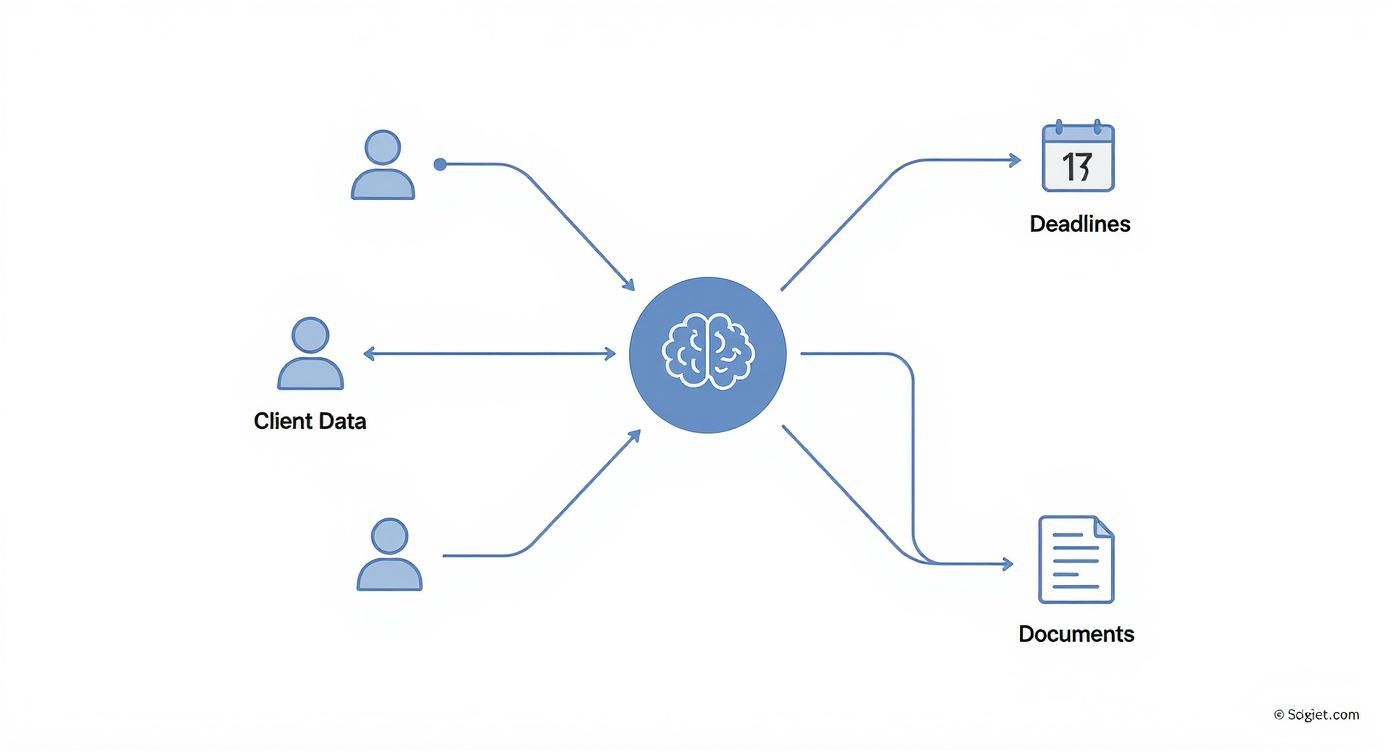
Think of the software as a central hub. It ensures that every piece of a case—from a client email to a court deadline—is interconnected and accessible from one spot. A new document can trigger a calendar event, which in turn can assign a task to a paralegal, creating a seamless flow that dramatically reduces the risk of something slipping through the cracks.
Integrated Time and Billing Systems
For a law firm, every billable minute counts. But trying to track time manually is a recipe for lost revenue. Activities get missed, notes get lost, and time goes unbilled. By integrating time and billing directly into your daily workflow, this problem disappears.
Attorneys can track their time as they work—while drafting a document, reviewing an email, or on a call with a client—often with just one click. The software then automatically compiles these entries into accurate, professional-looking invoices. This direct link between the work done and the bill generated doesn't just improve accuracy; it also massively speeds up the entire billing cycle.
It's no surprise that firms are catching on. Market forecasts show the global law practice and case management software market is expected to jump from USD 2.4 billion in 2025 to nearly USD 5 billion by 2031. This isn't just a niche trend; it's a fundamental industry shift, as detailed in market analysis from Infinity Business Insights.
The core idea is to make administrative tasks a natural byproduct of legal work, not a separate, burdensome chore. By automating these processes, the software ensures that nothing falls through the cracks.
Manual vs Automated Case Management Workflows
To really grasp the difference this technology makes, it helps to see a side-by-side comparison of how things used to be done versus how they're handled now.
| Task | Manual Method (The Old Way) | Automated Method (The New Way) |
|---|---|---|
| New Case Intake | Manually creating folders, typing client info into multiple spreadsheets, and printing hard copies. | A single digital form automatically creates the case file, populates client data, and sets up folders. |
| Deadline Tracking | Relying on a shared physical calendar, personal reminders, and manual data entry for court dates. | Rules-based calendaring automatically calculates and assigns critical deadlines with team-wide reminders. |
| Document Search | Searching through complex server folders, email inboxes, and physical files, often unsure of the latest version. | A global search function finds any document, email, or note across all cases in seconds, with full version history. |
| Billing | Manually compiling timesheets from notes, reviewing for errors, and creating invoices one by one in Word or Excel. | Time is tracked in real-time within the case file and converted into detailed, accurate invoices with a few clicks. |
This isn't just a minor improvement; it's a fundamental change in how law firms operate. By letting a reliable system handle the repetitive, administrative grind, legal professionals can finally dedicate their focus to where it matters most: serving their clients and growing the practice.
Strategic Benefits of a Centralized System

Bringing legal case management software into your firm is much more than a simple tech upgrade—it's a core business decision. When you look past the individual features, you start to see the profound impact it has on your firm's bottom line, its reputation, and its ability to compete. The real value isn't just about convenience; it’s about strengthening three critical pillars: firm efficiency, team collaboration, and client service.
This isn’t just a hunch; the market shows a clear trend. The legal tech sector was valued around USD 8.7 billion and is on track to reach USD 12.3 billion by 2032. That growth, a compound annual rate of 11.5%, is fueled by firms realizing that technology is no longer optional for handling complex cases and automating essential tasks.
Radically Improved Firm Efficiency
The first and most tangible benefit is slashing the time spent on non-billable administrative work. Automating those repetitive jobs—organizing documents, tracking deadlines, entering time—gives legal professionals their focus back. It frees them up to do what they do best: craft legal strategy, counsel clients, and prepare for court, instead of getting bogged down in busywork.
This newfound efficiency has a direct impact on the firm's capacity. You can take on more cases without necessarily having to hire more people. The system does the organizational heavy lifting, letting your current team manage a larger workload without burning out. It’s a straight line to increasing revenue and boosting overall profitability.
A centralized system doesn't just make your firm faster; it makes it smarter. By eliminating information silos and automating routine tasks, you create a more agile and responsive legal practice that can scale efficiently.
Seamless Team and Client Collaboration
We’ve all seen it: in a complex legal matter, a single miscommunication can cause costly mistakes or frustrating delays. A centralized legal case management software platform acts as the single source of truth for everyone. This ensures every team member, from senior partners to paralegals, is on the same page and working with the most current information.
It puts an end to the chaos of hunting through email chains or trying to figure out which version of a document is the final one. When a file is updated or a client email is logged, everyone with access sees it in real-time. This kind of transparency builds a more cohesive and effective team where collaboration is just part of the workflow, not an extra effort. For more on this, you can explore the broader impact of enterprise applications on business efficiency.
An Elevated Client Service Experience
Ultimately, these improvements circle right back to your clients. Many modern case management systems come with secure client portals, giving clients a clear window into how their case is progressing. Instead of having to call your office for a simple update, they can log in anytime to see key documents, upcoming dates, and recent activity.
This transparency does wonders for building trust and strengthening the attorney-client relationship. Automated updates and clear, consistent communication show you’re committed to keeping them in the loop, which massively boosts client satisfaction. And happy clients don't just come back; they become your best source of referrals, driving real, sustainable growth for the firm.
This level of service turns the client relationship into a genuine partnership. By providing clarity and being consistently communicative, you deliver a superior experience that truly sets your practice apart.
How to Choose the Right Software for Your Firm
Picking the right legal case management software is a huge decision. It's going to shape how your firm operates every single day for years to come, so you have to get it right. The market is crowded, and every vendor will tell you their platform is the best, but the actual best choice is the one that fits your firm's specific size, practice areas, and where you see yourself in the future.
The key is to have a game plan. Don't get distracted by flashy demos or a long list of features you'll never use. Instead, focus on a core set of criteria that genuinely affect how you work, how secure your data is, and ultimately, your firm's profitability. Here’s a practical checklist to help you cut through the noise and find a system that actually solves your problems.
Start With the Foundation: Cloud vs. On-Premise
Your first major fork in the road is deciding between a cloud-based system and a traditional on-premise setup. On-premise means you host the software on your own servers, right there in your office. This gives you direct, physical control over your data, but it also means you're on the hook for everything—maintenance, security, and expensive hardware upgrades.
Cloud-based software, on the other hand, is hosted by the vendor and you access it over the internet. For most firms today, this is the clear winner. Why?
- Accessibility: You can securely get to your firm's files and data from anywhere, on any device. You're no longer chained to your desk.
- Lower Upfront Costs: You don't have to shell out thousands for server hardware or hire an IT team just to keep it running.
- Automatic Updates: The vendor takes care of all the software updates and security patches, so you’re always running the latest and most secure version without lifting a finger.
The flexibility and built-in security of cloud solutions just make more sense for the way modern law firms need to work.
Evaluate Key Integration Capabilities
Your case management software can't be an island. To be truly effective, it has to talk to the other tools your team relies on every day. If it doesn't, you're just creating more manual work and disconnected information silos.
Before you even think about signing a contract, you need to check its integration capabilities. Does it sync with your email, like Outlook or Gmail, to automatically save client communications to the right matter? Can it connect to your accounting software, like QuickBooks, to make billing and reporting less of a headache? For many, the ideal platform blends the core functions of case management with the discipline of project management time tracking software, giving you a single source of truth for both work and billing. Solid integrations are the difference between a helpful tool and a truly central hub for your entire practice.
Prioritize Security and Compliance
For any law firm, data security isn't just a feature—it's everything. Protecting client confidentiality is your fundamental ethical duty. A data breach can be absolutely catastrophic, wrecking your firm's reputation and finances in one fell swoop. When you're looking at software, you have to dig deep on security.
A vendor's security infrastructure is a direct reflection of their commitment to protecting your clients. Due to economies of scale, top-tier cloud providers can invest in security measures far beyond what a typical small or mid-sized firm could afford on its own.
Get specific with potential vendors. Don't be shy about asking the tough questions:
- Data Encryption: Is all our data—both when it's being sent and when it's sitting on your servers—protected with strong encryption?
- Access Controls: Can we set granular, role-based permissions so that a paralegal can't see the same information as a managing partner?
- Compliance Certifications: Does the software meet key data protection standards like GDPR or HIPAA?
- Third-Party Audits: Do you regularly have independent security experts audit your systems to find and fix vulnerabilities?
Choosing a platform that takes security as seriously as you do gives you—and your clients—invaluable peace of mind. To get a wider perspective on platforms that serve your entire business, you can also explore our guide on selecting the right legal practice management software. This decision is all about protecting your most important asset: your clients' trust.
The Future of Case Management With AI
Legal case management software has come a long way from being a digital filing cabinet. We're now seeing it evolve into something much more powerful: a system of intelligence. Artificial intelligence and smart automation are turning these platforms into proactive, strategic partners for law firms. This isn't some far-off concept; it’s happening now and giving forward-thinking firms a real competitive advantage.
The fundamental shift is from being reactive to being predictive. Instead of just storing documents and tracking deadlines, the best systems are now starting to analyze that information. Think about an AI that can comb through thousands of discovery documents in minutes, flagging key evidence and potential inconsistencies faster than any human team possibly could. That ability alone completely changes the game for litigation prep.
From Automation to Augmentation
The first wave of legal tech was all about automating the tedious stuff—think calendaring, billing, and document templates. The next wave, the one we're in now, is about augmenting what legal professionals can do. It’s about giving them tools to make smarter, faster, and more data-driven decisions.
This change is already reshaping what people expect from their software. A recent study found that a staggering 87% of litigation professionals now view AI-assisted case management as essential for getting a tactical edge. This tells you just how deeply AI is weaving itself into the fabric of core legal work. You can get a deeper look at this trend in this helpful legal case management software guide.
So, where is AI making the biggest splash? A few key areas stand out:
- Predictive Analytics: By sifting through historical case data, AI can help forecast potential outcomes, estimate timelines, and even suggest litigation strategies based on what’s worked in similar cases before.
- Intelligent Document Analysis: AI tools can automatically review contracts to spot risky clauses, summarize lengthy depositions, and organize huge discovery caches by relevance.
- Automated Workflow Adaptation: An intelligent system can adjust on the fly. For example, filing a specific motion could automatically trigger a new checklist of tasks and deadlines for the team, ensuring nothing gets missed.
AI in legal software isn't here to replace lawyers. It’s here to equip them with supercharged tools that handle the heavy data lifting, freeing them up to focus on what they do best: high-level strategy, client counsel, and advocacy.
Practical Applications Today
These advanced capabilities are already in the wild. For instance, a platform with a built-in AI assistant, like the Navigator in Whisperit, can understand plain English commands to pull up case files or draft routine correspondence from a template. This closes the gap between thought and action, making the software feel less like a clunky tool and more like an extension of your own mind. You can explore more about how these tools are being used in our guide on generative AI for law firms.
As this technology matures, legal case management software will become an indispensable partner in legal strategy. It will uncover insights that were previously buried in mountains of data, helping firms operate with greater foresight and efficiency. The future of legal work isn’t just organized; it’s intelligent.
A Roadmap for a Smooth Implementation

Even the best software on the market is useless if your team doesn't embrace it. Think of your implementation plan as the bridge between purchasing a new system and actually getting value from it. A thoughtful rollout can turn this transition into a strategic win instead of a source of firm-wide frustration.
The goal is to make this change feel like a natural evolution, not a top-down mandate. A successful launch isn't just a switch you flip one Monday morning; it's a carefully planned process. It starts long before the software goes live, with clear communication and a real strategy for getting everyone on board.
Phased Rollout and Team Training
Instead of a "big bang" launch, it’s often smarter to start small. A phased approach lets you work out the kinks before they become major headaches. Pick a small pilot group of tech-friendly team members who can test drive the new workflows, spot potential issues, and act as your internal champions.
Of course, training is non-negotiable. But it has to be more than a boring feature tour. Your training should be practical and role-specific, showing attorneys, paralegals, and support staff exactly how the software solves their day-to-day problems. Focus on the "what's in it for me" for each role.
The real secret to a successful implementation is change management. It’s about turning skepticism into adoption by showing people, in no uncertain terms, how this new tool makes their lives easier, cuts down on busywork, and frees them up to focus on actual legal work.
Data Migration and Securing Buy-In
Getting your existing data into the new system is one of the most nerve-wracking parts of the process. Work hand-in-hand with your software provider to map out a clear plan for data migration. You'll need to decide what's essential to bring over and what can be archived. A clean data import is crucial for hitting the ground running.
Ultimately, this all comes down to securing buy-in from every single person. That doesn't happen with a memo; it happens by demonstrating real, tangible value. Show a tech-resistant partner how they can dictate notes directly into a case file using a voice-first feature, or how automated deadline reminders can lift a huge weight off their shoulders.
When people see the personal benefits firsthand, adoption becomes a natural next step. For a more structured approach, you can learn more by reviewing this change management plan example.
Frequently Asked Questions
Jumping into legal tech can feel like learning a new language. Let's clear up some of the most common questions about legal case management software so you can find the right fit for your firm.
How Does Legal Case Management Software Actually Make My Data More Secure?
It might seem counterintuitive to put your most sensitive data online, but it's often far safer than the alternative. Think about where your client information lives right now: scattered across email attachments, individual hard drives, and maybe even a few stray legal pads. That's a security nightmare.
A dedicated platform centralizes everything into one fortified location. This is a game-changer because it allows for strict, granular control. Top-tier systems add several critical layers of security:
- Encryption: Your data is scrambled both when it's being sent over the internet (in transit) and when it's sitting on the server (at rest). To anyone without a key, it's just gibberish.
- Role-Based Access: You get to be the gatekeeper. A managing partner can see everything, while a junior associate might only have access to the specific cases they're assigned to. This principle of least privilege is a security best practice.
- Audit Trails: The software keeps a running log of every single action. You can see who opened a document, who updated a contact, and exactly when they did it. This accountability is crucial for compliance and internal security.
Plus, cloud-based providers handle the heavy lifting of cybersecurity. They invest millions in infrastructure and threat monitoring—a level of protection most firms couldn't dream of affording on their own.
Is This Software Only for Big Firms?
Not at all. In fact, you could argue that small firms and solo lawyers have the most to gain. When you're running a lean practice, every minute counts. Time spent digging through emails for a file or manually calendaring deadlines is time you can't bill for, and it hits the bottom line hard.
Modern, cloud-based tools are built to be affordable and scalable. You don't need an in-house IT team to get them up and running. They give smaller practices the same organizational muscle as their bigger competitors, leveling the playing field. By taking repetitive administrative work off your plate, this software frees you up to focus on what you do best: practicing law and growing your business.
What's the Difference Between Case and Practice Management Software?
This is a really common question, and the distinction is all about scope.
Think of it this way: case management software is focused on the case file itself—the documents, key dates, contacts, and tasks for a specific matter. Practice management software is about the entire business of the law firm.
Practice management systems usually include all the features of a case management tool but then add functions for the business side of things, like client intake, time tracking, billing, and accounting.
Many of the best modern platforms, often called Legal Practice Management Systems (LPMS), do both. The right choice really just depends on your needs. Are you looking for a tool to help you organize your casework, or do you want a single, all-in-one system to run your entire firm?
Ready to see how a voice-first AI workspace can transform your firm’s efficiency and organization? Discover Whisperit and learn how our integrated platform unifies your entire legal workflow. Explore Whisperit today.