
Choosing Legal Project Management Software to Boost Firm Efficiency
If you’ve ever tried to manage a complex legal matter using a tangled web of spreadsheets, email chains, and sticky notes, you know the feeling. It’s chaotic. It’s stressful. And frankly, it’s an outdated way to work. Legal project management (LPM) software is the modern answer to that chaos.
At its core, LPM software is a dedicated platform designed to bring standard project management discipline—think clear timelines, budgets, and resource allocation—into the legal world. It’s about moving your team from a reactive, firefighting mode to a proactive, strategic one.
What Is Legal Project Management Software

Imagine trying to build a house without a blueprint. You might end up with a structure, but it’s unlikely to be on time, on budget, or even stable. For too long, law firms have managed high-stakes legal matters without a proper blueprint, relying on disconnected tools and individual heroics.
LPM software acts as that central blueprint and construction manager, all in one. It provides a structured environment where every task, deadline, document, and communication related to a matter lives in one place. This isn't just about organization; it's a fundamental shift in how legal work is planned, executed, and delivered to clients who now expect predictability and transparency.
From Chaos To Control
Think about a typical complex case. You have deadlines flying around, documents buried in email attachments, and a budget that’s little more than a "best guess" in a spreadsheet. This fragmented system is a recipe for missed deadlines, budget overruns, and ultimately, unhappy clients. It’s a constant struggle to just keep your head above water.
LPM software is designed to pull you out of that reactive cycle. It creates a single source of truth for every matter, giving everyone on the team—from partners to paralegals—a clear view of what needs to be done, by whom, and when.
This focused approach is different from general case management, which often centers more on document management and client databases. For a deeper dive into that distinction, our guide on what is legal case management breaks it down further.
Let's look at how these two approaches stack up.
Manual Tracking vs LPM Software
| Aspect | Traditional Approach (Spreadsheets & Email) | LPM Software Approach |
|---|---|---|
| Task Management | Disconnected to-do lists; no real-time visibility | Centralized task boards with assignments and deadlines |
| Budgeting | Manual entry in static spreadsheets; difficult to track | Real-time budget tracking against actual work |
| Communication | Buried in endless email threads; easy to miss key info | Centralized communication on the matter; all in one place |
| Reporting | Time-consuming manual reports; often outdated | Automated, real-time dashboards and reports |
| Client Visibility | Limited to periodic email updates and phone calls | Secure client portals for real-time progress updates |
The difference is night and day. One approach invites risk and inefficiency, while the other builds a foundation for predictability and control.
Core Principles Of LPM In Practice
Good LPM software isn't just a fancy to-do list; it’s built around the entire lifecycle of a legal matter. It provides practical tools to support each phase:
- Initial Planning: This is where you define the scope of work, set a realistic budget, and map out a timeline with key milestones. No more guesswork.
- Execution and Monitoring: Tasks are assigned, progress is tracked against the plan in real time, and billable hours are captured accurately as work happens.
- Closing and Evaluation: Once the matter is resolved, you can easily review performance against the original plan, generating powerful insights to make the next project even more profitable.
This structured approach transforms abstract legal work into a series of manageable, predictable steps. And the industry is taking notice. The global Legal Practice Management Software market was valued at USD 1.8 billion in 2023 and is projected to hit USD 4.2 billion by 2032. This explosive growth is a direct result of firms needing better ways to handle everything from case tracking to billing.
By providing a framework for planning, executing, and evaluating legal work, LPM software empowers firms to deliver consistent, high-quality service while maintaining profitability and client satisfaction. It’s less about software and more about a fundamental change in operational philosophy.
Essential Features of Top LPM Software
When you start looking at legal project management software, you'll quickly realize not all tools are built the same. While some are little more than glorified to-do lists, the really effective platforms are designed around the core operational pillars of a modern law firm. They’re less about just tracking tasks and more about creating a central hub for strategy, execution, and client communication.
Think of it this way: a basic map can show you the general direction, but a modern GPS gives you real-time traffic updates, turn-by-turn navigation, and instantly reroutes you when you hit a snag. The best LPM software is your firm’s operational GPS, guiding every single matter with that same level of precision.
These platforms aren't just for organization. They’re built to actively head off the common issues that eat into profitability and damage client trust—things like blown deadlines, budget overruns, and communication breakdowns.
Centralized Matter and Task Management
At its core, any great LPM software provides a centralized dashboard for matter management. This is your command center. It’s the single source of truth where every piece of information, from critical filing dates to individual assignments, lives in one easy-to-find place. This alone puts an end to the chaos of digging through scattered emails and disconnected spreadsheets.
Take a complex litigation case with dozens of motions, discovery requests, and court appearances. A powerful LPM tool lets you:
- Create Structured Workflows: You can break the entire case down into phases, tasks, and subtasks. This doesn't just bring clarity; it creates a repeatable playbook for similar matters down the road.
- Assign Clear Ownership: Every task gets assigned to a specific person—whether it’s a partner, an associate, or a paralegal. Ambiguity disappears, and accountability becomes crystal clear.
- Automate Deadline Tracking: The software can automatically calculate and calendar statutory deadlines, firing off reminders so critical dates never slip through the cracks. This feature alone is a huge safeguard against potential malpractice claims.
This level of organization completely changes how teams collaborate. Instead of a constant stream of "what's the status of X?" emails, everyone can see real-time progress, spot bottlenecks, and keep the matter moving forward.
Integrated Financial and Budgeting Tools
You can't manage a legal matter effectively if you aren't managing the money behind it. The best LPM software weaves financial tools directly into the workflow, tying the work being done to its budgetary impact in real time. Budgeting moves from a static spreadsheet you set and forget to a dynamic, living part of the project.
For instance, when an associate logs time on a research task, that data should instantly show up against the matter's budget. This gives partners an up-to-the-minute view of financial health, allowing for proactive conversations with clients about scope and spending before it becomes a problem.
This real-time financial visibility is a game-changer. It allows firms to stop being reactive to budget overruns and start managing client expectations proactively, building trust and preventing uncomfortable billing disputes down the road.
These financial tools almost always include:
- Budget vs. Actual Reporting: See exactly how much of the budget has been used at a glance.
- Automated Time Tracking: Capture billable hours accurately as the work happens.
- Simplified Invoicing: Generate detailed, precise invoices directly from the time and expenses tracked in the system.
Secure Collaboration and Client Portals
Modern legal work demands transparency. Clients are no longer content to be left in the dark, and a good LPM tool addresses this head-on with secure collaboration features. These tools create a controlled, secure space for sharing information with your internal team and, crucially, with your clients.
A secure client portal is a true standout feature. It gives clients a window into their matter's progress without handing them the keys to your firm's internal systems. Through the portal, they can review key documents, see upcoming deadlines, and communicate with the legal team in a secure, centralized place. This not only elevates the client experience but also cuts down on the administrative grind of sending constant email updates.
Internally, these tools streamline teamwork with features like task-specific comments, document version control, and shared calendars, making sure everyone is on the same page. For firms looking to push this even further, exploring dedicated legal workflow automation software can unlock even more powerful ways to connect people and processes. Ultimately, these features make collaboration seamless, secure, and fully documented.
The Core Benefits Driving LPM Adoption
So, why are so many firms finally ditching the old-school spreadsheets and chaotic email threads for dedicated legal project management software? It's not about chasing the latest tech trend. This shift is a calculated move, driven by real-world results that hit right at the heart of what it takes to run a successful modern legal practice.
Adopting LPM software is really about building a more efficient, profitable, and client-friendly firm. It brings structure to the otherwise frenetic pace of legal work, turning unpredictable workflows into well-oiled machines. This change has a direct impact on the bottom line, strengthens client loyalty, and seriously cuts down on operational headaches. Let’s break down the three biggest wins.
Boosting Firm Profitability
Let's be honest: law firm profitability is all about capturing the full value of the work you do. Manual systems are like leaky buckets—untracked time, bad estimates, and scope creep all lead to lost revenue from write-offs and awkward billing conversations. LPM software is designed to plug those leaks.
By building time tracking right into the daily workflow, the software makes sure every billable minute gets recorded accurately, right when the work happens. No more trying to piece together your week on a Friday afternoon. Plus, with real-time budget-versus-actuals dashboards, partners can see the financial health of any matter at a glance.
This kind of visibility lets you have proactive discussions with clients about budget, heading off any surprises before the final invoice. It changes billing from a point of tension to a chance to show transparency and control. You can dive deeper into how this works by reading our guide on the game-changing benefits of workflow automation.
Strengthening Client Relationships
In a market this crowded, keeping clients happy is everything. Today's clients expect more than just a win; they want clarity and predictability every step of the way. This is where LPM software becomes your secret weapon for delivering a top-tier client experience.
By providing a clear project plan, predictable costs, and regular progress updates, LPM software turns a legal matter into a collaborative journey rather than an opaque process. This transparency builds a foundation of trust that is essential for long-term client loyalty.
Secure client portals are a game-changer here. They give clients their own 24/7 window into their case, letting them see key documents, check on milestones, and send secure messages without adding to the email avalanche. This keeps clients in the loop and makes them feel like valued partners, not just bystanders.
Reducing Operational and Malpractice Risk
Finally, and perhaps most importantly, LPM is about managing risk. The legal field is a minefield of potential slip-ups, from blown deadlines to client conflicts, that can cost a firm its reputation and a lot of money. Legal project management software acts as a powerful safety net.
A centralized calendar with automated reminders dramatically lowers the risk of missing a critical filing date—a frighteningly common source of malpractice claims. On top of that, automated conflict-checking during intake can stop a firm from accidentally taking on a case it shouldn't.
The numbers back this up. In the U.S. legal tech market, which is expected to hit US$13.5 billion by 2032, firms using this tech are shortening project timelines by 35% and cutting manual errors by up to 40%. They're also seeing 50% faster billing cycles and a 25% jump in client satisfaction—critical stats when 55% of lawyers are now working remotely. You can check out more stats in the full U.S. LegalTech market analysis.
How to Select the Right LPM Software
Choosing the right legal project management software can feel overwhelming, but a structured approach can make all the difference. The goal is to cut through the marketing noise and find a platform that genuinely fits your firm's unique DNA—your size, practice areas, existing workflows, and where you plan to be in five years.
Think of it like buying a car. A solo practitioner might just need a reliable sedan, while a large, multi-practice firm needs a whole fleet of specialized vehicles. If you rush the decision, you can end up with a tool that's either too simple to be useful or so complicated that no one ever uses it. A careful evaluation process ensures you drive away with the right fit.
Assemble Your Selection Team
First things first, get the right people in the room. This isn't just an IT decision; it's a firm-wide operational shift. Your selection committee should be a solid cross-section of your team to make sure every perspective is heard.
- Partners and Decision-Makers: They hold the purse strings and the strategic vision.
- Associates and Paralegals: These are your daily power users. They know the real-world workflows and pain points inside and out.
- Office or Firm Administrator: This person will likely manage the implementation, training, and the ongoing relationship with the vendor.
- IT Personnel: They’re essential for vetting the technical specs, security protocols, and how the new software will play with your existing systems.
Getting buy-in from this group from the very beginning is the secret sauce for successful adoption later. It guarantees the software you choose solves actual problems for the people who will be using it every single day.
Define Your Firm's Core Needs
Before you even glance at a single demo, you need to be brutally honest about what you're trying to fix. Sit down with your team and create a "pain point inventory." What are the biggest headaches and bottlenecks in how you work right now?
A common mistake is to shop for features before you've diagnosed the problems. A feature is only valuable if it solves a real, specific need at your firm. Start with your challenges, not the vendor’s sales pitch.
This list of pain points becomes your personal scorecard for judging every potential solution. It keeps you focused on what will actually move the needle on your firm’s productivity and profitability, rather than getting distracted by the latest bells and whistles. For a deeper look at the various options available, you can explore our detailed guide on different types of legal practice management software.
Key Questions for Evaluating Vendors
Once you know exactly what you need, it's time to start talking to vendors. A structured checklist is your best friend here, allowing you to compare each platform apples-to-apples. This keeps you from being swayed by a slick presentation and keeps the conversation centered on your core requirements.
A good vendor evaluation checklist helps you dig into the details that matter most. Below are some of the essential questions you should be asking every potential provider.
Vendor Evaluation Checklist
| Category | Key Questions to Ask |
|---|---|
| Security & Compliance | Where will our data be hosted (e.g., EU, US)? What are your data encryption standards, both in transit and at rest? How do you ensure our firm remains compliant with regulations like GDPR? |
| Integration Capabilities | Can your software integrate with our existing accounting system, like QuickBooks? Does it offer two-way sync with our email and calendars (Outlook, Google Workspace)? |
| Onboarding & Support | What does the full implementation process look like, and how long does it typically take? Do you offer personalized training for our team? What are your support hours and guaranteed response times? |
| Scalability & Pricing | Is the pricing per user, per matter, or based on feature tiers? Are there hidden costs for data storage, support, or training? Can the software easily scale with our firm as we grow? |
Asking these direct questions empowers you to make a decision based on evidence, not just promises. This is how you uncover the true cost of ownership, gauge the ease of adoption, and see how the software will slot into your existing tech stack. This systematic approach is the difference between simply buying a piece of software and investing in a true solution.
It's no surprise that cloud-based tools now dominate 60% of the legal software market; they can cut IT costs by 50% compared to on-premise servers, a massive factor to weigh during your evaluation. You can explore more data on the legal software market trends to get a better handle on these industry shifts.
A Roadmap for Successful Implementation
You’ve signed the contract for your new legal project management software. That’s a huge step, but the journey is just beginning. The real work—and where you’ll actually see the value—is in getting your team to use it. Without a solid plan, even the best software becomes expensive shelfware, gathering digital dust while everyone sticks to their old habits.
Think of it like getting a new, high-tech piece of equipment for a surgical suite. You wouldn’t just unbox it and expect the surgeons to figure it out mid-operation. You'd have a detailed plan for installation, training, and integration. Bringing new software into a law firm demands that same deliberate approach.
The selection process itself is the foundation for a smooth rollout. This graphic shows the key steps you should have already taken.
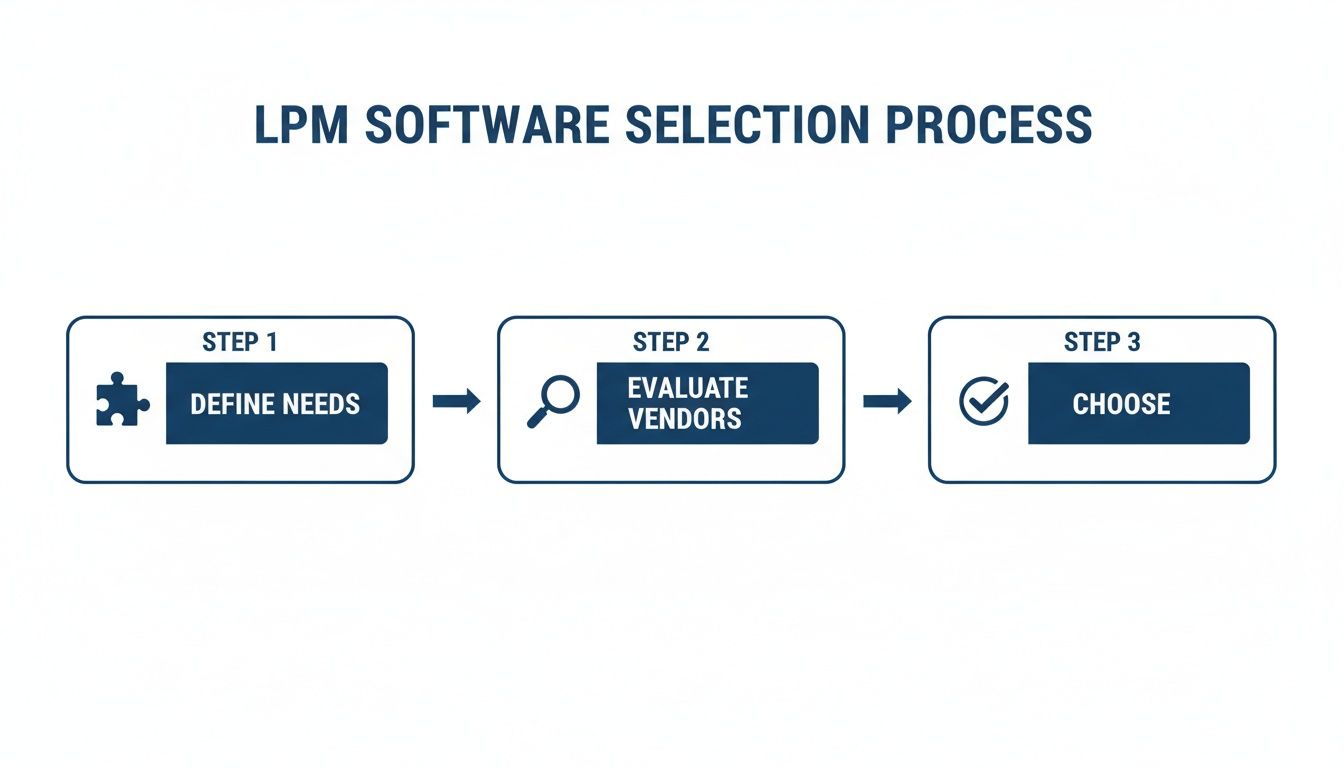
When you follow a process like this, you end up with a tool that solves real problems your firm has. That makes the argument for actually using it a whole lot easier.
Begin with a Phased Rollout
Trying to switch everyone over to a new system at once—the "big bang" approach—is a recipe for chaos. It’s too much, too soon. A much smarter way to go is a phased rollout.
Start small. Pick a single practice group or a handful of tech-friendly attorneys to be your pilot group. They get to kick the tires in a low-stakes environment.
This group will uncover any glitches, give you honest feedback on what works (and what doesn't), and help you fine-tune your training program before it goes firm-wide. Plus, their success stories become your best marketing tool for winning over the skeptics.
Appoint an Internal Champion
Every big change needs a champion. This isn't just a project manager; it's a respected person in the firm, maybe a partner or a senior associate, who genuinely gets the "why" behind the new software. They see the vision and are excited to make it happen.
Your champion's job is to:
- Keep the Ball Rolling: Make sure the implementation stays on the agenda and doesn't get pushed aside by daily fires.
- Build Support: Answer questions, calm nerves, and constantly communicate the benefits to their peers.
- Talk to the Vendor: Act as the single point of contact between your firm and the software company.
Having a dedicated, enthusiastic champion on the inside can make all the difference.
Prioritize Customized Training and Data Migration
One-size-fits-all training sessions are a waste of time. A paralegal needs to know different things than a partner does. To be effective, your training has to be role-based, focusing on the specific tasks and workflows each person will actually use. This makes the training relevant and immediately useful.
Successful implementation is fundamentally a change management exercise. It's less about installing software and more about reshaping habits and workflows, which requires a deep understanding of human factors and a commitment to supporting your team through the transition.
Just as important as training is a crystal-clear plan for data migration. How will you get all your existing client files, case histories, and contacts into the new system without losing anything or disrupting active matters? A clean, accurate data transfer is non-negotiable. It ensures your team can start working on day one without missing a beat. For more on structuring this kind of transition, take a look at this practical guide on building a change management plan example.
The Future of LPM with AI and Voice
The next big step for legal project management is already happening. We're moving past just clicking on dashboards and checking boxes, entering a much more natural, conversational era for legal tech. The fusion of artificial intelligence and voice technology is fundamentally changing how legal work gets done by closing the gap between having an idea and putting it into action.
This isn't about robots replacing lawyers. It’s about giving legal professionals a serious upgrade, stripping away the administrative busywork that bogs them down.
At the heart of this change is the voice-first AI workspace. Think about it: instead of navigating through layers of menus to do something simple, you just say what you need. This turns clunky, multi-step processes into a single, smooth command, letting you keep your mind on your client and your case, not on the software.
The Power of Conversational Commands
Imagine you’ve just hung up from a client call. Without even reaching for your mouse, you say, “Create a task to draft the merger agreement, due this Friday, and assign it to Jane.” The system instantly gets it—the task, the deadline, and the person responsible—and just does it. The time you save on that one action, multiplied across hundreds of interactions a week, really adds up.
This isn’t just for creating tasks, either. Voice commands can take on a whole range of the daily administrative grind:
- Starting and stopping timers for dead-accurate, real-time billing.
- Dictating detailed case notes that go straight into the correct matter file.
- Searching for specific documents across all your cases with a simple question.
- Scheduling meetings and sending invites without ever opening your calendar.
This shift to a voice-driven interface is the real endgame for legal tech. The goal is to make the software so seamless it practically disappears, letting you work at the speed of thought.
As firms start to build AI into their legal project management software, it's critical to think about the bigger picture. When bringing AI into the legal field, it's wise to look at AI ethics, compliance, and risk management to see how other industries are handling it and ensure a responsible rollout.
Ultimately, this future is about more than just a cool new feature. It's about getting back the time that gets eaten up by admin. By using voice and AI to manage projects, lawyers can pour their energy into what really matters—strategy, analysis, and high-value client work. This drives better outcomes for clients and a healthier bottom line for the firm. This isn’t some far-off concept; it’s the next practical step in making legal work flow better.
Answering Your Top Questions About LPM Software
Jumping into any new technology brings up questions, and that's a good thing. Before a firm commits to a new platform, partners and legal teams need to know it's secure, that it will play nice with existing systems, and that it’s actually worth the investment. Let's tackle some of the most common questions we hear about legal project management software.
Is It Secure Enough for Client Data?
This is usually the first question, and for good reason. When you're dealing with sensitive client information, security is non-negotiable. Top-tier LPM vendors get this. They build their platforms with layers of protection, like end-to-end encryption and routine third-party security audits.
Many also offer hosting options in specific regions (like the EU or US) to comply with data residency laws like GDPR. This means you can be confident your firm's data is not only protected but also stored in a way that meets your legal obligations.
Is LPM Software Only for Big Law?
It’s easy to think of project management tools as something only massive firms with sprawling teams would need. But that’s a common misconception. Many of the best LPM platforms today are built to scale, offering flexible pricing and simple setups perfect for solo practitioners and small firms.
Think about it: when you have a lean team, every minute counts. LPM software automates the administrative busywork and keeps all your case details in one place. It helps smaller firms punch well above their weight, giving them the operational muscle to compete with much larger players.
The real return on investment (ROI) here isn't just about saving money. It's about winning back billable hours that were lost to chaos, minimizing the risk of expensive mistakes, and providing a level of service that turns clients into advocates for your firm.
Will It Work With Our Other Tools?
Nobody wants a new piece of software that creates more work. The big question is always integration: will this new platform talk to the tools we already rely on? The answer is almost always yes. Leading LPM software is designed to be a team player.
They typically offer seamless integrations with the essentials your firm already uses, like QuickBooks, Outlook, and Google Workspace. This ensures the platform fits neatly into your existing workflow instead of making you start over from scratch.
Ready to see how a voice-first approach can solve your firm's project management challenges? Discover Whisperit, the AI workspace built to unify your legal work, reduce administrative friction, and let you focus on what matters most. Learn more at whisperit.ai.