
A Guide to Privileged User Cybersecurity Responsibilities
As a privileged user, your cybersecurity responsibilities are all about protecting an organization's most critical systems. This means you’re on the hook for following strict access rules, keeping your credentials locked down, and always being on the lookout for threats. Think of yourself as the first and most critical line of defense against a major data breach—because to an attacker, your account is the ultimate prize.
The Weight of the Keys to the Kingdom

Imagine being handed a master key that can unlock every single digital door in your company. We're talking about everything from sensitive client records and financial data to the very servers that keep the business online. That’s what it feels like to be a privileged user.
These roles, typically held by system administrators or IT managers, aren't just technical jobs. They are positions of immense trust.
The power that comes with these accounts is vital for keeping things running smoothly, but it also creates a massive target. Cybercriminals specifically hunt for these credentials because getting their hands on just one privileged account can give them the run of the entire network.
The High Stakes of Privileged Access
The numbers really bring this risk into focus. A recent report found that compromised privileged accounts were involved in a shocking 33% of all security incidents. This isn't just a statistic; it's a clear signal that understanding your role as a guardian is an absolute necessity.
This guide is your roadmap to mastering the duties that keep a business safe. We’ll walk through the essential security controls, the legal and compliance pressures, and the incident response plans that define the modern privileged user's responsibilities.
Your privileged account is the ultimate target for attackers. Treating it with the highest level of security isn't just best practice—it's the only way to protect the organization from a devastating breach.
To get a quick overview of what this role entails, the table below breaks down the core duties and why each one is so important.
Key Responsibilities of a Privileged User at a Glance
| Responsibility Area | Core Duty | Why It Matters |
|---|---|---|
| Access Control | Adhere strictly to the Principle of Least Privilege (PoLP). | Limits potential damage if an account is compromised. |
| Credential Security | Use strong, unique passwords and multi-factor authentication (MFA). | Creates multiple barriers for attackers to overcome. |
| System Monitoring | Actively monitor for and report unusual activity. | Enables early detection of threats before they escalate. |
| Compliance & Policy | Understand and follow all internal security policies and external regulations. | Avoids legal penalties, fines, and reputational damage. |
| Incident Response | Know your role in the incident response plan and act quickly. | Minimizes the impact of a security breach. |
Each of these areas is a critical piece of the puzzle.
A huge part of managing this responsibility today involves the cloud. It's crucial to grasp the shared responsibility model, which outlines what the cloud provider handles versus what you do. Taking some time to understand the customer’s responsibilities within the shared security model is non-negotiable for protecting cloud assets.
When you fully embrace these duties, you stop being just an IT professional and become a true cornerstone of your organization’s security.
Understanding Your Power and Its Inherent Risks
Think of privileged access as the ultimate double-edged sword in cybersecurity. It’s the power you need to install critical software, tweak system settings, and manage user accounts—all the tasks that keep the lights on. But that power comes with a tremendous, and often overlooked, amount of risk.
A single compromised privileged account isn't just a minor hiccup; it's a potential company-ending event. Why? Because these accounts are the number one target for attackers. Getting control of one gives them a direct line to your organization's crown jewels—the most sensitive data and critical systems you have.
The Domino Effect of a Single Breach
Let's walk through what this looks like in the real world. Imagine a hospital system administrator’s account gets compromised through a clever phishing email. That attacker now holds the "master key" to the entire kingdom.
What happens next is a nightmare scenario:
- Massive Data Exfiltration: The attacker could quietly download thousands of patient records, triggering massive HIPAA violations and multi-million dollar fines.
- System Sabotage: They could deploy ransomware across the network, locking up essential systems like electronic health records and appointment schedulers, grinding hospital operations to a halt.
- Lateral Movement: Using the admin's access, the attacker can create hidden backdoors, move silently through the network, and set up camp for the long haul, siphoning off data for months or years.
This isn’t just theoretical. The fallout from just one privileged account takeover can be catastrophic, threatening the very survival of an organization.
The Reality of the Insider Threat
When people hear "insider threat," they usually picture a disgruntled employee plotting in the shadows. While that certainly happens, the far more common danger comes from simple, unintentional mistakes. The privileged user cybersecurity responsibilities you carry are designed to guard against both.
A well-meaning but careless action can be just as destructive as a malicious one. Forgetting to log out of an admin session, reusing a weak password, or falling for a phishing scam can hand an attacker the keys they need on a silver platter.
An "insider threat" isn't always a villain in a hoodie. More often, it's a trusted colleague who made an honest mistake. Your security hygiene is the barrier that prevents that one mistake from becoming a disaster.
This is precisely why accountability is so important. Every action taken with your elevated privileges leaves a digital footprint. Keeping clean, detailed records isn't just about ticking a compliance box; it's a core security practice. If you're looking to tighten up your processes, diving into audit trail best practices is a fantastic starting point for building a culture of transparency.
Ultimately, your role demands constant vigilance. The first and most critical step is recognizing that your access is a powerful tool—one that can either build and protect systems or inadvertently bring them crashing down. Security hygiene isn't just a list of suggestions; it’s a fundamental, non-negotiable part of your job.
Mastering Essential Security Controls
Knowing the risks that come with privileged access is one thing; actually mastering the controls to shut those risks down is a whole different ballgame. These aren't just abstract ideas—they're the practical, hands-on tools you'll use to build a real defense around your systems.
Think of these controls as layers. Each one you add makes an attacker's job exponentially harder. Your direct involvement in using them isn't optional; it's a core part of your privileged user cybersecurity responsibilities.
Embrace the Principle of Least Privilege
The absolute foundation of good security is the Principle of Least Privilege (PoLP). It's just common sense. If a plumber needs to fix a sink in one bathroom, you don't give them the master key to the entire building. You give them the key to that one room, and only for as long as they need it.
The same exact logic applies to your digital access.
PoLP means you should only have the bare-minimum access needed to do your job. For everyday tasks like sending emails or working on documents, stick to your standard user account. You should only switch over to your privileged account when a specific task absolutely requires those elevated permissions.
This one habit massively shrinks the target on your back. If a phisher compromises your standard account, they hit a dead end instead of getting a free pass to your most sensitive data.
Fortify Access with Multi-Factor Authentication
Let's be clear: passwords alone are a broken defense. Multi-Factor Authentication (MFA) is the mandatory upgrade, requiring you to provide at least two pieces of evidence to prove you are who you say you are. It’s like a bank vault that requires both a key and a PIN code.
Even if a hacker steals your password, MFA stops them cold because they don't have that second piece of the puzzle—like a code from an authenticator app or a tap from a security key.
Enabling MFA on all privileged accounts is proven to block over 99.9% of automated account attacks. It's one of the single most powerful moves you can make.
Your job isn't just to use MFA, but to be its biggest advocate. Any privileged account without it should be treated like a critical system with the front door left wide open.
Monitor and Review Every Privileged Session
You can't protect what you can't see. Active session monitoring is all about keeping a detailed record of everything that happens when a privileged account is in use. It creates an audit trail that answers the critical questions: who did what, when, and from where?
This isn't about micromanaging people. It’s about accountability and spotting threats before they blow up. Modern tools can flag weird behavior in real-time, like an admin logging in from a strange country at 3 AM.
Combining this with regular access reviews—where you verify that everyone's permissions are still correct and necessary—is how you stay ahead of trouble. This proactive vigilance is the heart of responsible access management.
To see how these concepts connect, this table breaks down each control, what it protects against, and where you fit into the picture.
Comparing Core Security Controls
The table below offers a straightforward comparison of these essential security controls, outlining their function, the risks they mitigate, and your specific role in making them effective.
| Control | Primary Function | Risk Mitigated | User's Responsibility |
|---|---|---|---|
| Least Privilege (PoLP) | Restricts user access to the bare minimum required for their job. | Unauthorized access, lateral movement, and accidental data alteration. | Using a standard account for daily tasks and only escalating to privileged access when necessary. |
| Multi-Factor Auth (MFA) | Requires multiple forms of verification before granting access. | Credential theft, phishing attacks, and brute-force password guessing. | Ensuring MFA is enabled on all privileged accounts and never approving suspicious login requests. |
| Session Monitoring | Records and logs all actions taken with privileged credentials. | Insider threats (malicious or accidental) and helps in forensic analysis. | Reporting any unusual activity you observe and participating in regular log and access reviews. |
Putting these technical pieces in place is a great start, but they work best as part of a larger, more structured program. For a deeper look at building out that strategy, check out these privileged access management best practices.
Use Secure Password Vaulting
Privileged accounts demand long, complex, and unique passwords. Let's be realistic—nobody can remember all of them. This leads to bad habits, like writing them on sticky notes or, even worse, reusing them.
A secure password vault is the solution. It’s an encrypted digital safe for all your login credentials. You just need to remember one strong master password to unlock it, and the vault handles the rest, auto-filling complex passwords for you.
This simple tool completely eliminates the temptation to reuse passwords and makes it easy to use a unique, super-strong password for every single service. It's a massive upgrade for your first line of defense.
2. Meeting Legal and Compliance Demands
As a privileged user, your actions don't just stay within the company—they have real-world legal consequences. The power you hold comes with responsibilities that are often spelled out in federal law and industry regulations. What might feel like a routine task for you is actually a critical compliance step that shields the organization from massive fines and legal headaches.
These aren't just vague corporate guidelines; they're hard rules from powerful regulatory bodies. Getting it wrong can have dire consequences, placing your role at the very center of the company's ability to operate legally and maintain its good standing.
How Your Day-to-Day Actions Connect to Major Regulations
It's crucial to understand that many of your daily security tasks are directly linked to specific legal frameworks. Grasping this connection makes the work feel less like just "IT policy" and more like what it is: a legal necessity.
Here’s a quick look at how your duties tie into some of the biggest regulations out there:
- GDPR (General Data Protection Regulation): Every time you enforce the Principle of Least Privilege, you're helping the company meet GDPR’s strict mandate that data access must be limited to only what is absolutely necessary for a person's job.
- HIPAA (Health Insurance Portability and Accountability Act): In healthcare, keeping detailed audit logs and performing regular access reviews aren't optional. They're core HIPAA requirements. Your diligence creates the evidence that proves patient data is being protected exactly as the law demands.
- SOX (Sarbanes-Oxley Act): For publicly traded companies, enforcing Segregation of Duties (SoD) is fundamental to SOX compliance. By making sure no single person can control a key financial process from start to finish, you're actively preventing fraud and protecting the integrity of the company's financial reports.
See the pattern? These aren't just IT best practices. They are legal requirements, and you are on the front lines of fulfilling them.
A Real-World Example: The Surprise Healthcare Audit
Picture this: a large hospital system is hit with an unannounced HIPAA audit. The auditors aren't there to read policy documents; they're there to see the digital proof. Their primary question is, "Show us who accessed sensitive patient records over the last six months and why."
This is the moment where your work determines whether the hospital passes the audit or gets slapped with millions in fines.
Thankfully, you've been on top of it. The auditors find a clear, comprehensive audit trail. They can see that every time a privileged account touched a patient database, the system logged the user's ID, the exact timestamp, and what they did. Better yet, they find documentation of the quarterly access reviews you helped run, certifying that every user’s permissions were still appropriate.
In an audit, your detailed logs and documented reviews are not just technical data. They are the hard evidence that proves your organization takes its legal responsibilities seriously.
In this scenario, your consistent work directly saves the organization from crippling financial penalties and a public relations nightmare. It makes the abstract idea of "compliance" feel very real, and very important.
Keeping the Proof You Need to Stay Compliant
Compliance isn't just about doing the right thing—it's about proving you did the right thing, often months or years later. That’s why meticulous documentation is an absolute must. We're talking about everything from detailed access logs to clear records of any changes made to a user's permissions.
This is exactly why having a solid framework is so critical. A well-defined policy acts as the blueprint for all compliant activity. If you're looking to build or strengthen your own approach, our access control policy template is a great place to start.
Furthermore, when it comes to securely disposing of data, privileged users must follow established protocols to meet legal requirements. It's essential to align with recognized frameworks like the NIST SP 800-88 data sanitization standards for businesses. Following these guidelines ensures that when data is destroyed, it's done in a secure, legally defensible manner.
Your Role During a Security Incident
When a security incident hits, the clock isn't ticking in days or hours—it's ticking in minutes. As a privileged user, you’re not just a bystander; you're the digital first responder. The choices you make in the first few moments can be the difference between a minor blip and a full-blown catastrophe. This is arguably one of your most critical privileged user cybersecurity responsibilities.
It’s all about acting calmly and deliberately when the pressure is on. Your immediate goal is containment. You need to stop the attacker in their tracks and prevent them from causing more damage. This is more than just shooting an email to the IT helpdesk; it requires decisive, pre-approved actions to shrink the blast radius.
Immediate Containment Actions
The moment an incident is confirmed, your job title changes from administrator to defender. Your entire focus needs to shift to isolating the threat and stopping it from spreading like wildfire across the network.
Here are the key moves to make right away:
- Isolating Compromised Systems: If you’ve pinpointed a server or workstation as the source of the trouble, pull it off the network. Unplug the cable, disable the network adapter—whatever it takes. This severs the attacker's connection and stops them from jumping to other systems.
- Revoking Suspect Credentials: See an account behaving erratically? Disable it. Instantly. This applies to user accounts, service accounts, and especially any other privileged accounts that might be compromised.
- Implementing Emergency Blocks: Get into the firewall or network controls and start blocking suspicious IP addresses or domains that are talking to your systems. This can be a game-changer for stopping data from leaving your network.
These quick, decisive actions are like slamming a door in an intruder's face. It buys precious time for the formal incident response team to get their bearings and launch a full investigation.
Your detailed, real-time observations during an incident are forensic gold. Noting exact times, error messages, and unusual behaviors can slash investigation and recovery times, turning chaos into a clear, actionable trail for security analysts.
Preserving Evidence for Forensic Analysis
While stopping the bleeding is priority number one, you have to balance it with preserving evidence. A knee-jerk reaction like wiping a compromised machine might feel productive, but it can destroy the digital breadcrumbs investigators need to figure out what happened, how it happened, and how far the damage goes.
The process below illustrates a simple flow for ensuring compliance, and its principles—review, log, and segregate—are just as critical during an incident response.
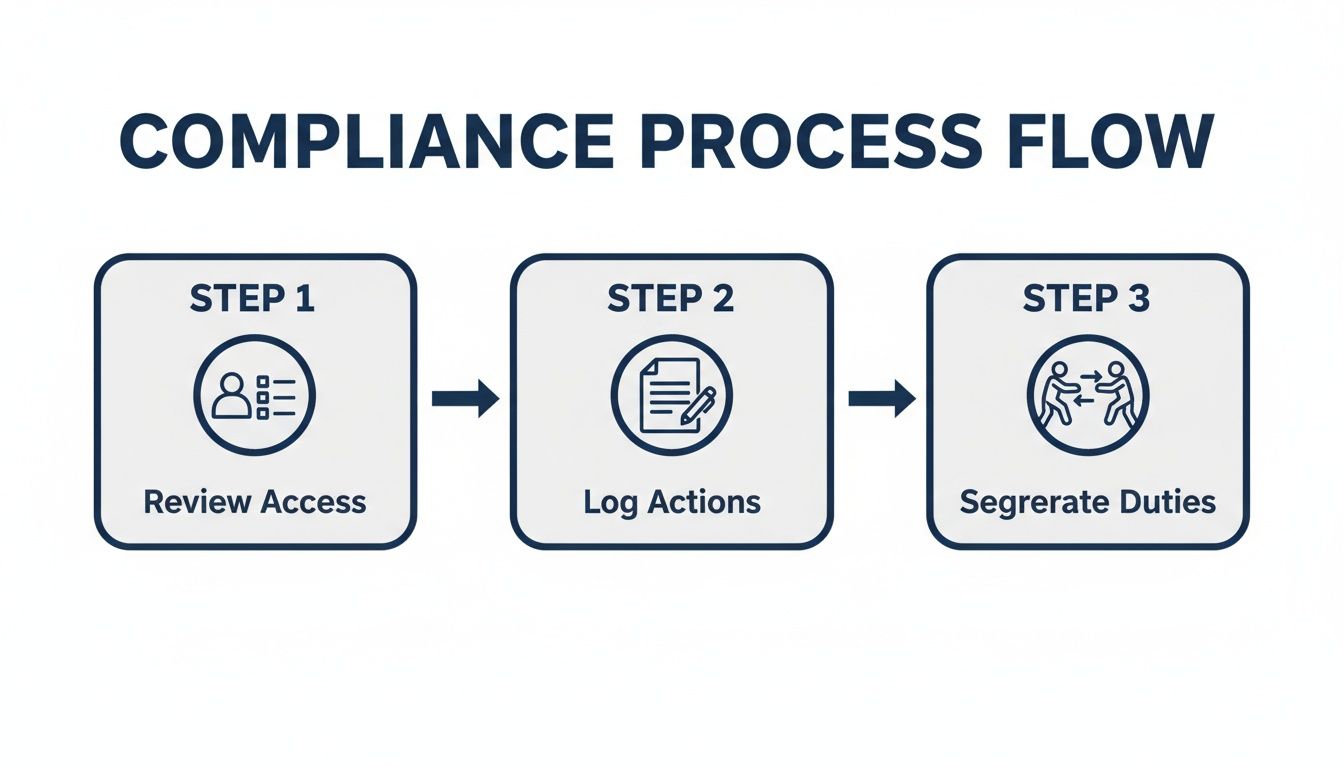
This methodical approach is vital. Every step needs to be documented and accounted for, especially when you're in the heat of the moment.
As a privileged user on the scene, you need to:
- Document Everything: Keep a running log of every single action you take, complete with precise timestamps.
- Avoid Altering the System: Don't make changes that could overwrite evidence unless it's absolutely essential for containment.
- Communicate Clearly: Give the security team the straight facts. Tell them exactly what you saw and what you did, without any speculation.
Knowing these responsibilities is a huge step, but they work best when they're part of a larger, well-rehearsed plan. To see how your role fits into the complete process, check out our ultimate guide to building an effective security incident response plan. By mastering your part, you become a powerful force in protecting your organization's most valuable digital assets.
Securing Privileged Access in the Age of AI
The moment artificial intelligence enters your organization's workflow, your role as a privileged user gets a major upgrade. Suddenly, you're not just guarding servers and databases. You're now the gatekeeper for AI models, the vast pools of sensitive training data they learn from, and the automated systems that are becoming the lifeblood of the business.
Think of it like this: your new domain is a high-tech workshop. Inside, you have incredibly valuable raw materials (the training data) and extremely powerful, one-of-a-kind tools (the AI models). Your job is to make sure only the right people get into the workshop, and that they only use the tools they’re supposed to, exactly how they’re supposed to.
This brings us straight to the Principle of Least Privilege (PoLP), which needs to be applied just as rigorously to AI platforms. A data scientist who's training a new model on anonymized data has no business touching the core infrastructure the AI runs on. Likewise, an AI tool built into a secure workspace should only ever have permission to see the specific data it needs for a single task—never the entire client file.
New Threats Lurking in AI Workflows
AI doesn't just introduce new tools; it brings new and often subtle risks. The classic threats of direct system breaches are still there, but now we're dealing with more complex problems like accidental data exposure and even outright model manipulation. Your monitoring has to evolve to catch these new kinds of threats.
Instead of just flagging a suspicious login from an odd location, you now need to be on the lookout for strange data access patterns. For example, if an AI assistant that normally transcribes meeting notes suddenly tries to pull down thousands of unrelated client records, that's a massive red flag. It could signal anything from a simple misconfiguration to a full-blown system compromise. Preventing these kinds of data leaks through AI-driven processes is now job one.
The heart of securing AI is really about data governance. As you bring AI into the fold, your main responsibility is to make sure the controls protecting the data get stronger, not weaker. Every new AI feature has to be brought on board with a security-first mindset.
Your Checklist for Onboarding AI Technologies Securely
You can't just plug in a new AI tool and hope for the best. Integrating these capabilities requires a deliberate, methodical process. This checklist gives you the essential steps to follow, ensuring security is baked in from the start, not slapped on as a hurried afterthought.
- Run a Security Deep-Dive: Before anything gets connected, put the AI vendor under a microscope. Scrutinize their security posture, their data handling policies, and all their compliance certifications.
- Enforce Least Privilege: Right away, define and lock down strict, role-based access controls. This goes for both your human users and any service accounts the AI uses to operate.
- Watch the Data Like a Hawk: Set up continuous monitoring specifically to spot unusual data access by AI tools or developers. Get alerted to anomalies immediately.
- Audit Access Relentlessly: On a regular schedule, review who has access to AI systems and the sensitive data they touch. If they don't need it anymore, revoke it. No exceptions.
- Build a Governance Framework: Work with your leadership team to create crystal-clear rules for how AI can and cannot be used. For a head start on this, you can learn more about building out strong AI governance best practices to establish a solid foundation.
By getting out in front of these challenges, you're not just a gatekeeper; you're an enabler. You're making it possible for the organization to adopt incredible new AI tools without cracking its security foundation.
Frequently Asked Questions
Let's dig into some of the questions that come up time and again when you're managing privileged access. Getting the day-to-day application right is what separates a strong security culture from one that just looks good on paper.
What’s the Single Most Important Thing I Need to Do?
If you take only one thing away from this guide, let it be this: live by the Principle of Least Privilege. It’s the bedrock of everything else.
This means you should be doing your everyday work—like reading emails, browsing the web, or working on documents—from a standard, non-privileged account. Only log into your "super-user" account when you absolutely need those elevated permissions to do a specific task. Once you're done, log out.
Think of it this way: your standard account is your daily driver. It’s exposed to the world. A breach there is a fender-bender. But if your privileged account gets compromised, an attacker has just stolen a master key to the entire company. Keeping them separate is your single most effective defense.
Sticking to the Principle of Least Privilege is like being a bank manager. You don't walk around all day with the main vault key clipped to your belt. You keep it locked away safely and only take it out when you need to open the vault.
How Often Should I Be Reviewing My Team’s Access Rights?
As a rule of thumb, a thorough access review should happen at least quarterly. It’s a good rhythm for catching permissions that have gone stale.
However, if your team is working with highly sensitive data—think patient records in healthcare or client financial data in a law firm—or if you have a lot of people moving in and out of roles, you need to tighten that up. In those cases, monthly reviews are a much safer bet.
Your job during these reviews isn't just to rubber-stamp a list. You need to actively confirm that every person still needs every bit of access they have. If someone’s role has changed or they’ve left the team, revoking their old permissions needs to happen immediately, not at the end of the quarter.
What if I Think a Coworker Is Misusing Their Privileged Access?
Your first and only duty here is to protect the organization. Full stop. You must report your concerns right away using the official channels your company has set up. This will usually be the Chief Information Security Officer (CISO), the compliance team, or a specific security hotline.
Whatever you do, don't try to investigate it yourself or confront the person directly. This could tip them off, destroy evidence, or even put you in a difficult or risky position. Your responsibility is to report what you saw, stick to the facts, and let the designated security and HR teams handle the formal investigation. Following the proper procedure is a core part of your privileged user cybersecurity responsibilities.
Ready to secure your legal workflows with an AI partner built for compliance? Whisperit unifies your dictation, drafting, and collaboration in a voice-first workspace with Swiss/EU hosting, end-to-end encryption, and GDPR-aligned controls. Discover how you can work faster and safer by visiting the Whisperit website.