
Case Management Systems Legal - case management systems legal insights
For any modern law firm, a legal case management system is the digital command center. It takes all the scattered files, calendars, client messages, and internal notes and pulls them into one cohesive, organized hub. Think of it as the central nervous system for your entire legal operation, designed to bring calm and order to the often chaotic world of managing multiple cases.
What Are Legal Case Management Systems
Imagine an air traffic controller trying to manage dozens of planes without a central radar system. They'd be juggling radio calls, handwritten notes, and pure guesswork—a recipe for disaster. Before specialized software, many law firms operated in a similar state of organized chaos, drowning in paper files, overflowing email inboxes, and disconnected spreadsheets.
A legal case management system is that digital air traffic controller for your practice. It’s a software platform that centralizes every last piece of information and every single task related to a legal matter. This isn't just a fancy digital filing cabinet; it’s a living, breathing workspace that actively connects your documents, deadlines, client communications, and team responsibilities.
From Paper Trails to Digital Hubs
The shift from physical files to digital systems has been a game-changer. The old way of doing things was notoriously prone to human error, maddening inefficiency, and serious security risks. Finding one specific document could mean digging through a mountain of paper for hours, and making sure everyone on the team had the most current version was a constant battle.
Today’s systems tackle these problems head-on. They create a single source of truth for every case, ensuring that every action—from sending a quick email to logging a billable hour—is captured and easily accessible. This isn't just about making life more convenient; it’s a strategic move to deliver better client service and build a more resilient practice.
To get a better handle on the basics, check out our guide on what case management is in law.
This move toward digital is powering some serious market growth. The global legal case management software market is expected to jump from USD 9.80 billion in 2026 to USD 13.4 billion by 2033. Big firms are leading the charge, projected to hold 56.7% of the market share, which shows just how essential these structured solutions have become in complex legal settings. You can discover more insights about this market growth on coherentmarketinsights.com.
Manual vs Digital Case Management at a Glance
The difference between the old way and the new way is stark. This table breaks down the contrast between relying on manual processes and adopting a dedicated system.
| Aspect | Manual Approach (Paper and Spreadsheets) | Digital System Approach (LCMS) |
|---|---|---|
| Information Access | Slow and difficult; requires physical access to files. | Instant and remote; information is available anywhere. |
| Collaboration | Fragmented; relies on emails and meetings, leading to version control issues. | Centralized and real-time; everyone works from the same data. |
| Task Management | Disconnected; often managed with personal to-do lists or basic calendars. | Integrated and automated; tasks are linked to cases and deadlines. |
| Security | Vulnerable to physical loss, theft, or unauthorized access. | Robust and controlled with encryption and user permissions. |
| Auditing & Reporting | Time-consuming and manual; prone to errors and inconsistencies. | Automated and accurate; provides instant insights and compliance trails. |
| Efficiency | Low; significant time is spent on administrative and repetitive tasks. | High; automation handles routine work, freeing up staff for legal strategy. |
As you can see, a digital system doesn't just digitize old processes—it fundamentally improves them, paving the way for a more productive and secure practice.
Who Benefits from These Systems
The value of the case management systems legal teams use ripples throughout the entire organization. It's not a tool just for attorneys.
- Managing Partners get a bird's-eye view of case progress, team productivity, and overall firm profitability. No more guesswork.
- Attorneys and Paralegals can finally focus more on high-value legal work and less on administrative drudgery, thanks to automated workflows and having all case info in one place.
- Compliance Officers find it much easier to conduct audits, track key actions, and ensure the firm stays on the right side of regulations like GDPR or SOX.
- Clients ultimately get better, faster service because their legal team is organized, responsive, and always has the right information right when they need it.
In the end, these systems provide the bedrock for a more efficient, secure, and client-focused legal practice.
What Are the Core Features of a Modern Case Management System?
To really get a feel for the case management systems legal teams rely on, you have to look under the hood. These platforms aren't just fancy digital filing cabinets; they're intelligent, active workspaces built around a specific set of tools for navigating the day-to-day grind of legal work. Every piece is designed to work together, turning a chaotic flood of information into a clear, actionable view of your entire caseload.

Think of it like building a house. You can’t just throw up some walls. You need a solid foundation, a sturdy frame, and functional systems like plumbing and electricity. In the same way, a good legal case management system is built from several essential modules that give your firm’s operations structure and power.
The Central Case Hub
At the very heart of any system is the case file itself. This is the central command post for a specific matter, containing every last piece of related information. But it's so much more than a simple folder full of documents; it’s a living, breathing hub that organizes everything in a way that just makes sense.
- Matter Details: This is your cheat sheet. It captures the foundational data like case type, key dates, assigned attorneys, and current status, giving anyone on the team a quick summary at a glance.
- Contact Management: This feature works like a relationship map, linking every single person—clients, opposing counsel, witnesses, judges—directly to the case. No more digging through separate contact lists or old email chains to find someone's details.
- Calendar and Deadline Tracking: Integrated calendars are your best defense against malpractice. They automatically track court dates, filing deadlines, and statutes of limitations, and—most importantly—send reminders to the team so nothing ever slips through the cracks.
Document and Communication Management
Let's be honest: the sheer volume of documents and emails can be overwhelming. A solid system brings order to this chaos, ensuring every piece of information is both secure and easy to find when you need it. For a closer look at taming the paper trail, check out our guide on legal document management.
With this centralized approach, you can finally stop worrying about version control or hunting down that one critical email attachment buried deep in a colleague's inbox. Everything is stored, tagged, and searchable right within the context of the case it belongs to.
A well-implemented system can shrink discovery review from an all-day slog into a task that takes just a few minutes. This frees up your team to shift from administrative busywork to high-value client advocacy and strategic thinking.
Automation and Workflow Tools
This is where a good system truly becomes a great one. Workflow automation is like having a digital paralegal who handles all the repetitive, process-driven tasks without you lifting a finger. Not only does this save a staggering amount of time, but it also enforces consistency across your entire firm.
Think about onboarding a new client. An automated workflow can instantly:
- Create the new case file in the system.
- Generate a standard engagement letter from an approved template.
- Assign the initial tasks to the right paralegal and associate.
- Schedule the first client meeting on the team's calendars.
These kinds of automated sequences dramatically reduce the risk of human error, ensure everyone follows firm procedures, and let your team focus on practicing law instead of ticking boxes on a checklist.
Collaboration and Voice-First AI Integration
Modern legal work is a team sport. A top-tier case management system provides the tools that help your team work together seamlessly, whether they're in the same room or on different continents. Features like secure internal messaging, shared task lists, and version-controlled document editing keep everyone perfectly in sync.
This is also where next-generation tools like voice-first AI are changing the game. Platforms such as Whisperit plug directly into your case management workflow, allowing you to manage your entire caseload with simple spoken commands. Imagine being able to say, “Whisperit, open the Johnson litigation file,” or “Draft a response to the latest email using the client update template.” This transforms the system from a passive database into an active assistant that takes your instructions and gets to work. This kind of capability slashes clicks and screen time, making the whole process faster and more intuitive for busy legal professionals.
The Real-World Benefits for Your Legal Team
It’s one thing to read a list of software features, but it's another thing entirely to see what they actually do for your team. When you look past the technical jargon, you start to see how a case management system can fundamentally change the daily grind of a legal practice. It’s all about turning abstract tools into real-world results that help you build a more profitable, reliable, and frankly, less stressful firm.
This transformation really comes down to three core benefits: boosting efficiency, creating bulletproof consistency, and ensuring ironclad auditability. Each one tackles a major headache that legal professionals know all too well, turning points of friction into sources of strength. For a lot of firms, making this switch isn't just an upgrade—it's a strategic move to keep up.
And the industry is definitely shifting. The market for case management systems legal teams rely on is expected to jump from USD 6.3 billion in 2025 to a massive USD 12.8 billion by 2033. That growth is being driven by firms hungry for the kind of efficiency gains and cost savings that come from automated workflows and having every file in one central place. Discover more insights about this legal tech market growth on datainsmarket.com.
Reclaiming Time Through Enhanced Efficiency
Think about a typical morning for a litigation associate. Without a proper system, it’s a chaotic scramble. Maybe they spend 30 minutes digging through a messy shared drive for one specific document, another 15 trying to align calendars for a deposition, and 20 more minutes drafting a routine client update from scratch. Before 10 a.m., they’ve already burned over an hour on non-billable admin work.
Now, imagine that same morning with a dedicated system. The associate finds that document in seconds with a case-specific search. They book the deposition instantly using a shared calendar that shows everyone’s availability. That client update? They generate it in a minute using a pre-approved template that pulls in the case data automatically.
Suddenly, that lost hour is back. The associate can now spend their time on what they were hired to do: legal analysis, strategy, and winning cases. This isn't just a small improvement; it's a game-changer for productivity and your bottom line.
Building Trust with Unbreakable Consistency
Inconsistent processes are a silent killer. They slowly erode quality and client trust. When every attorney or paralegal has their own way of handling client intake, naming documents, or tracking deadlines, critical steps inevitably get missed. A forgotten filing deadline or a misplaced piece of evidence can be catastrophic.
A case management system acts as your firm's rulebook, enforcing a standard way of doing things. It guides everyone through the same essential steps for any given task, every single time.
- Standardized Intake: Every new matter starts on the right foot, capturing the exact same crucial information from the get-go.
- Automated Checklists: Complex processes like discovery or trial prep become foolproof, ensuring no detail is overlooked.
- Consistent Communication: Templates help maintain a professional, uniform voice across all client emails and letters.
This kind of consistency does more than just reduce risk. It creates a predictable, high-quality experience for your clients, which is how you build a rock-solid reputation and earn their trust for the long haul. You can explore more strategies for this in our guide on case management best practices.
Ensuring Compliance with Ironclad Auditability
For anyone in a compliance or managing partner role, proving that protocols were followed is just as important as following them in the first place. Without a central system, creating an audit trail is a total nightmare. You're left trying to piece together a story from scattered emails, handwritten notes, and conflicting memories.
A case management system solves this problem elegantly by creating an unchangeable, time-stamped log of every single action taken on a case. Every document view, every task checked off, every client email sent—it's all recorded automatically.
This creates a digital record that’s as good as gold. When a question about compliance comes up, you don't need to launch a painful investigation; you just pull a report. This is invaluable for meeting tough regulatory standards like GDPR or SOX and provides a powerful defense against potential malpractice claims. It turns compliance from a reactive, stressful task into a proactive, built-in part of how you work every day.
Navigating Security, Compliance, and Data Hosting
In the legal field, data security isn’t just a nice-to-have; it's a core ethical obligation. When a client hands over their most sensitive information, you’re not just taking on a case—you’re becoming the guardian of their privacy. This responsibility makes a thorough security review of any case management systems legal teams consider absolutely non-negotiable. One oversight can put your clients, and your firm’s reputation, at serious risk.
Protecting that data is about much more than a strong password. Modern systems build a digital fortress around your information using multiple layers of defense. The first line is end-to-end encryption, which essentially scrambles your data into unreadable code while it's in transit and when it's sitting on a server. Only someone with the right key can decipher it.
Then you have granular access controls. Think of it like a building's keycard system. The managing partner might have a master key that opens every door, but a junior paralegal's key will only grant them access to the specific floors—or case files—they’re assigned to. This prevents both accidental and intentional internal breaches.
Choosing Your Hosting Model
One of the biggest decisions you'll make is where your data actually lives. The choice between on-premise and cloud-based hosting impacts everything from security and cost to your team's ability to work remotely. There’s no single right answer; it all comes down to your firm's resources, risk tolerance, and need for control.
A vendor’s security certifications, like SOC 2 or ISO 27001, aren't just fancy acronyms. They are hard-earned proof that the provider subjects their security practices to rigorous, independent audits. These certifications give you objective confidence that a vendor can be trusted with your firm’s most valuable asset: its data.
An on-premise setup means you buy and maintain your own servers, right there in your office. This gives your IT department total control over the entire environment, from the hardware up. The flip side? Your firm is on the hook for everything—the initial cost, ongoing maintenance, security patches, and backups. When it's time to retire old hardware, you're also responsible for using secure hard drive destruction methods to ensure no trace of client data remains.
On the other hand, a cloud-based (SaaS) model means a provider like Whisperit hosts the software and your data on their own highly secure servers. This lifts a massive weight off your IT team's shoulders, as the vendor handles all the technical heavy lifting. It also makes your firm more agile, giving your team secure access to case files from court, a client’s office, or home.
Hosting Model Comparison for Legal Firms
To help you weigh the pros and cons, it’s useful to see how these two models stack up on the factors that matter most to law firms.
| Factor | On-Premise Hosting | Cloud-Based (SaaS) Hosting |
|---|---|---|
| Initial Cost | High (requires purchasing servers, software licenses, and IT infrastructure) | Low (typically a predictable monthly or annual subscription fee) |
| Control | Maximum (your firm controls all hardware, software, and security protocols) | Limited (control is shared with the vendor, who manages the core infrastructure) |
| Maintenance | Full responsibility (your IT team handles all updates, patches, and backups) | Vendor's responsibility (provider manages all technical maintenance and updates) |
| Accessibility | Limited (often restricted to the office network unless a VPN is configured) | High (secure access from any location with an internet connection) |
| Scalability | Difficult (requires purchasing and configuring new hardware to grow) | Easy (plans can be scaled up or down as your firm's needs change) |
Ultimately, the decision comes down to a trade-off between control and convenience.
The Importance of Data Residency and Sovereignty
For any firm with international clients, where your data is physically stored becomes a critical compliance question. Data residency is the geographical location of the servers holding your data. Data sovereignty means that data is subject to the laws and regulations of the country where it’s stored.
Regulations like GDPR in Europe are incredibly strict on this point. If you’re handling the personal information of EU citizens, you might be legally required to store that data within the EU or a country with equivalent privacy laws. Failing to do so can result in massive fines. This makes it essential to partner with a vendor that offers hosting in specific jurisdictions to keep your firm compliant. You can dive deeper into this topic in our guide on https://www.whisperit.ai/blog/data-residency-compliance.
How to Choose and Implement the Right System
Picking a case management systems legal platform is a big deal. It’s a decision that will shape how your firm operates for years to come. This isn't just about buying a piece of software; you're investing in a new way of working. Get it right, and you’ll energize your team and impress your clients. Get it wrong, and you could be looking at months of friction and disrupted workflows.
The secret is to look past the shiny feature lists and focus on what will actually make a difference in your day-to-day practice.
The whole process has to start with an honest look at what your team truly needs. Will this system play nice with the tools you already rely on? Does its AI actually save time, or is it just a buzzword? Can you bend its templates and workflows to fit your firm's unique way of doing things? Answering these questions up front is the first real step toward a successful rollout.
Key Criteria for Selecting Your System
When you're comparing options, it's easy to get lost in the details. A methodical approach is your best friend here. Concentrate on the core functions that will have the biggest impact on your team's productivity and sanity.
- Seamless Integration: Your new system can't be an island. It absolutely must connect with the tools you live in every day, like your email client (think Outlook), document storage, and billing software. If your team has to constantly jump between different apps, you're not gaining efficiency—you're losing it.
- Practical AI and Transcription: Look for AI that solves a real problem, not just a theoretical one. For instance, a voice-first AI like Whisperit's Navigator lets you manage cases with simple spoken commands, turning a conversation into concrete actions. Another game-changer is real-time transcription that accurately captures dictation directly into a document, cutting out hours of tedious typing.
- Flexible Templates and Layouts: In the legal world, one size never fits all. The best systems let you heavily customize document templates and workflows. You need the power to create structured outlines for drafting, apply your firm’s specific style profiles, and generate final documents with custom export layouts that automatically handle things like letterhead and formatting.
This is less about features and more about control. You need a system that adapts to your firm, not the other way around.
Your Step-by-Step Data Migration Checklist
So, you’ve picked your system. Now comes the critical part: moving your data and getting your team on board. A well-planned, phased rollout is the key to minimizing disruption and building confidence.
- Data Cleanup and Preparation: Before you move a single file, clean house. Archive old cases, create a standard naming convention for your files, and get rid of duplicate contacts. Starting with clean data is the only way to avoid a "garbage in, garbage out" situation.
- Configure and Customize: Work with your new vendor to set the system up to mirror your firm's processes. This means creating custom fields, building out your initial workflow templates, and defining who has permission to see and do what.
- Pilot Program with a Small Group: Don't go all-in at once. Pick a small, tech-friendly team to test-drive the new system on a few live cases. This pilot phase is your chance to find and fix any quirks before everyone is using it.
- Comprehensive Team Training: Training needs to be hands-on and specific to each person's role. Show your paralegals how it will make their daily checklists easier. Show your attorneys how it will help them claw back billable hours. Always focus on the "what's in it for me" for every user.
- Phased Firm-Wide Rollout: Roll out the system team by team or by practice group. This approach allows your implementation leaders to provide focused support and manage the change without being overwhelmed.
- Gather Feedback and Iterate: The work doesn't stop on launch day. Keep gathering feedback from your team to refine workflows, build new templates, and make sure everyone is actually getting the full value out of the system.
Remember, the biggest hurdle in implementation is almost always user adoption, not the technology. A gradual, supportive rollout that highlights the personal benefits for each team member is the single most important factor for success.
A trustworthy system is built on a foundation of solid data security—encryption, access control, and secure hosting. This is what that looks like in practice.
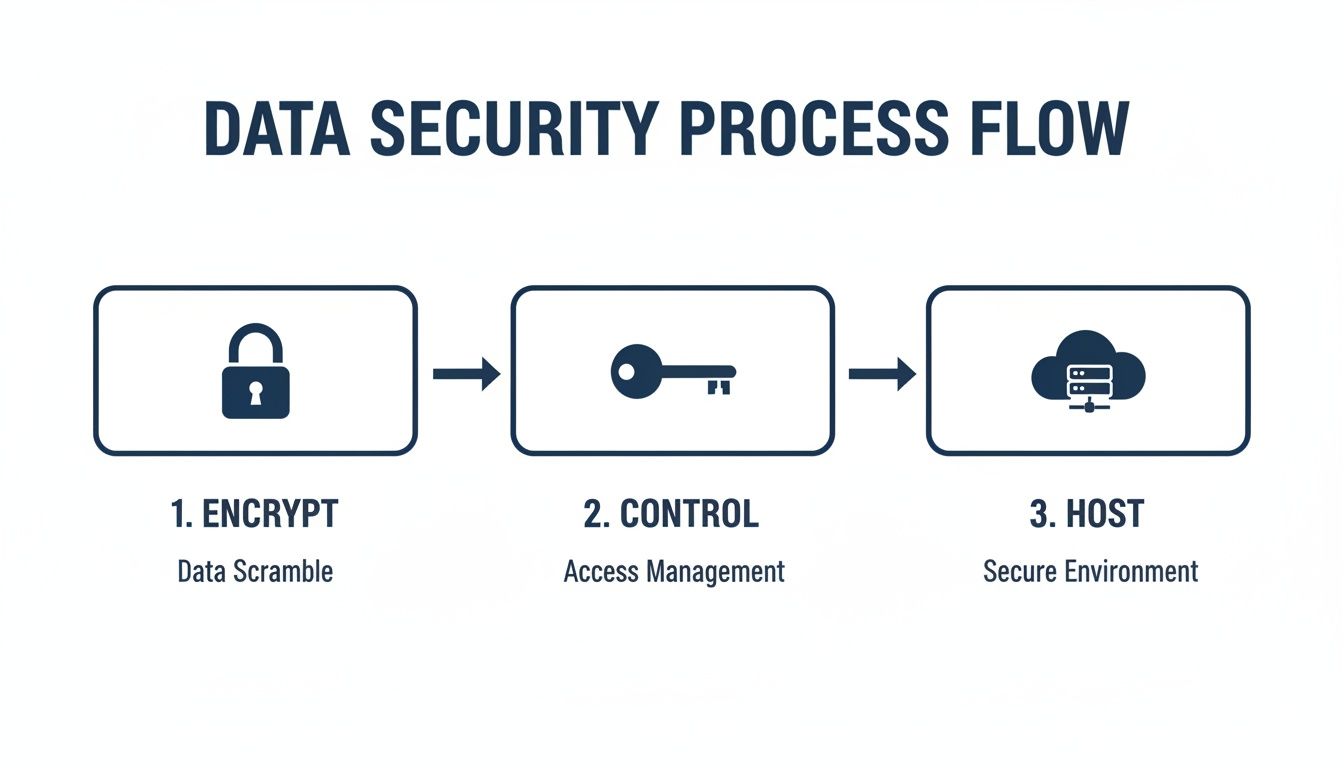
This visual shows how a truly secure system uses multiple layers of protection. It starts with scrambling your data through encryption and finishes by placing it in a secure, controlled hosting environment.
Calculating the True Return on Investment
Finally, let's talk about ROI. Measuring the value of a case management system goes way beyond just the sticker price. A proper calculation looks at both the hard numbers you can track and the "soft" benefits that are just as important.
- Hard ROI: These are the metrics you can put a dollar sign on.
- Time Saved: Calculate the hours your team no longer spends on administrative grunt work (like searching for documents or manual data entry) and convert that into billable time.
- Reduced Overhead: Add up the savings from using less paper, ink, and physical storage space.
- Soft ROI: These benefits are about your firm's health and your own peace of mind.
- Improved Client Satisfaction: When you can respond faster and communicate more consistently, you build client loyalty. That leads directly to more referrals.
- Reduced Attorney Burnout: Automating the tedious parts of the job boosts morale and helps you keep your best people.
- Lowered Risk: Having a complete audit trail and standardized processes drastically reduces the chances of a missed deadline or a costly compliance mistake.
A great system doesn't just pay for itself in money; it pays for itself in peace of mind. For firms ready to take the next step, you can find a deeper analysis in our full guide on choosing the best case management software for a law firm.
Frequently Asked Questions
When you're looking at case management systems legal teams will depend on every single day, you’re bound to have questions. This is a big decision that will shape your firm’s future, so getting straight answers is non-negotiable. Here are the most common questions we hear from lawyers, IT leaders, and compliance officers, answered in plain English.
How Does a Legal Case Management System Differ from a Document Management System?
This question comes up all the time, and it's a critical one. The easiest way to think about it is with an analogy.
A Document Management System (DMS) is like a state-of-the-art, hyper-organized digital library. Its job is to store, track versions, and control access to your firm's documents. It's fantastic at keeping your files in pristine order.
A Legal Case Management System (LCMS), on the other hand, is the entire law office in a single platform. It includes that digital library (the DMS) but connects it to everything else that makes a case run.
An LCMS is the central hub that manages the full context of a matter, including:
- Case Vitals: Key dates, who's assigned, and the current status at a glance.
- Relationship Mapping: Instantly see the connections between clients, opposing counsel, witnesses, and experts.
- Communication Logs: A complete, searchable history of emails and calls tied directly to the case.
- Task Management: A clear view of assignments, deadlines, and who is responsible for what.
- Automated Workflows: Smart sequences that automatically handle routine, repetitive tasks.
In short, a DMS manages the what (the documents), while an LCMS manages the who, what, when, and how of the entire case from start to finish.
What Is the Biggest Challenge When Implementing a New LCMS?
It's almost never the technology. Surprisingly, the single biggest hurdle is almost always user adoption. Lawyers are creatures of habit, and asking them to change the way they've worked for years can be met with serious resistance, no matter how much better the new system is.
Your success will come down to a smart change management plan that puts your people first.
A smooth transition has far more to do with managing the human element than it does with technical specs. The goal is to make the team want to use the new system because they can clearly see how it makes their lives easier.
To get it right, a successful rollout needs to include:
- Secure Buy-In From the Top: Get senior partners to be vocal champions for the change. When leadership is genuinely enthusiastic, the rest of the firm is much more likely to get on board.
- Focus on the "Why": During training, don't just show them what a button does. Show them how that button will save them three hours of mind-numbing admin work each week or eliminate that one task they all hate.
- Start Small and Build Momentum: Kick things off with a pilot group of your most tech-savvy team members. Let them work out the kinks and become internal advocates before you launch it firm-wide.
Can AI Truly Improve Case Management, or Is It Just Hype?
The AI we're seeing today is genuinely useful—it's moving these systems from being passive digital file cabinets to active, intelligent assistants. When it's integrated thoughtfully into your daily work, the impact is real and immediate. The trick is to look past the buzzwords and find AI that solves a real-world problem.
For example, voice-first AI in a platform like Whisperit changes how you interact with your cases. Instead of clicking through five different screens, you can just say, "Find the inspection report in the Johnson case," and the system pulls it up instantly. This isn't some far-off concept; it's a practical tool that removes friction from your day.
Other high-impact AI applications include:
- Real-Time Transcription: AI can instantly and accurately transcribe your spoken notes directly into case files or legal documents, saving countless hours of typing.
- Automated Summaries: Modern systems can analyze long depositions or confusing email chains and generate a concise summary, helping you get up to speed in minutes.
- Intelligent Drafting: AI can use pre-approved templates to create first drafts of common client letters or internal memos, ensuring consistency and freeing up your time.
This isn’t hype. It’s about targeted automation that frees up lawyers to focus on the high-value strategic work they were trained to do.
How Do I Calculate the ROI of a Legal Case Management System?
Figuring out the true return on investment means looking well beyond the sticker price of the software. A proper ROI analysis has to account for both the "hard" financial returns you can count and the "soft" benefits that are just as valuable to your firm’s health.
Hard ROI (The Tangible Numbers) These are the metrics you can track on a spreadsheet.
- Time Savings: Add up the hours your team gets back from administrative tasks (searching for documents, manual data entry, etc.) and multiply that by their billable rate.
- Reduced Overhead: Calculate your cost savings on printing, paper, toner, and physical file storage. It adds up faster than you think.
- Fewer Errors: Estimate the financial hit you avoid by preventing missed deadlines, compliance fines, or other costly mistakes.
Soft ROI (The Strategic Value) These benefits are just as crucial, even if they don't have a clear dollar sign attached.
- Happier Clients: Faster response times and more consistent communication lead to better client relationships, which means more referrals and repeat business.
- Better Employee Morale: Taking away the frustrating, repetitive work reduces burnout and helps you keep your best people, saving you a fortune in recruitment and training costs.
- Bulletproof Risk Management: A rock-solid, time-stamped audit trail is your best defense against potential malpractice claims and makes compliance checks a breeze.
A powerful ROI is the sum of money saved, efficiency gained, and risk eliminated.
Ready to see how a voice-first AI workspace can bring a new level of efficiency and consistency to your firm? Discover Whisperit, the platform built to unify dictation, drafting, and case management, giving your legal team a calmer, more productive workflow. Learn more at whisperit.ai.